 PixelCircles
Star Generator for Minecraft
A five-point Minecraft star 15 blocks wide takes 44 blocks as an outline and 77 filled in. Use this Minecraft star generator to draw stars with 3 to 12 points at any size, set how spiky they are and how they are turned, and count every block. Works for Java and Bedrock. Download a .litematic schematic and import it into Minecraft Java with Litematica — build over the hologram in survival or paste it in creative.
| Material | Blocks |
|---|---|
| Stone | 64 |
Click a block to mark it placed.
Readout coordinates: x points east and z south, counted from the centre block; on an even size, 0, 0 is the block just south-east of the centre.
Keys: ↑↓ size · T style · E tools
For the Litematica mod: put the file in .minecraft/schematics, press M in game, then Load Schematics. The file stands the shape up as a wall one block thick.
Row-by-row block counts
| Row | Blocks | Columns with a block |
|---|---|---|
| 1 | 1 | 11 |
| 2 | 1 | 11 |
| 3 | 1 | 11 |
| 4 | 2 | 10, 12 |
| 5 | 2 | 10, 12 |
| 6 | 2 | 10, 12 |
| 7 | 2 | 9, 13 |
| 8 | 6 | 1–2, 9, 13, 20–21 |
| 9 | 14 | 2–8, 14–20 |
| 10 | 2 | 4, 18 |
| 11 | 2 | 5, 17 |
| 12 | 2 | 6, 16 |
| 13 | 2 | 7, 15 |
| 14 | 2 | 7, 15 |
| 15 | 3 | 7, 11, 15 |
| 16 | 4 | 6, 10, 12, 16 |
| 17 | 6 | 6, 8–9, 13–14, 16 |
| 18 | 4 | 6–7, 15–16 |
| 19 | 4 | 5–6, 16–17 |
| 20 | 2 | 5, 17 |
How to use
- Set the size and options above the plan.
- Click a block to mark it placed as you build.
- Download the .litematic, or print the plan.
This Minecraft star generator draws a star block by block. Choose the number of points, the size and how deep the notches go, then build from the plan or download it as a PNG or a Litematica file. Use it for flags, tree toppers, sheriff badges, compass roses and sunbursts.
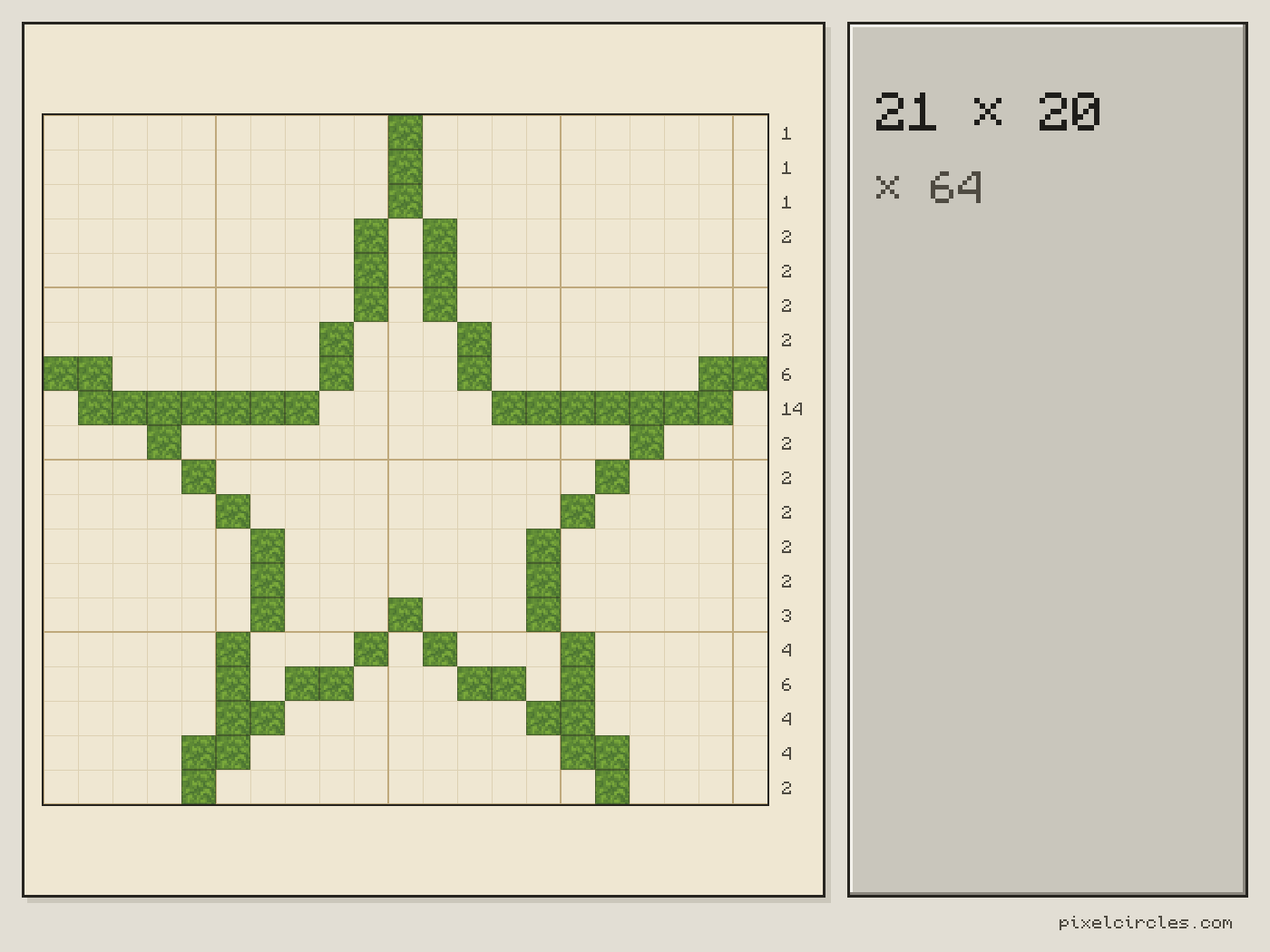
How to build a star in Minecraft
A star is harder to eyeball than a circle. It has sharp tips and deep notches, and if one spike is a block too long the whole star looks crooked.
The generator works it out for you. It takes a perfect star with two radii, one for the tips and one for the notches, and fills every block whose centre lands inside it. The inner radius slider sets how spiky the star is: around 30% gives long thin spikes, 55% gives a friendly cartoon star, and 80% starts to look like a flower.
At 0° rotation the upright star is mirror-symmetric, so the left half of every row is a copy of the right half. Build one side and mirror it.
The six most useful shapes in the Minecraft star generator
The presets above the sliders set the points and inner radius in one click. Here is what each one looks like at 21 blocks, and how many blocks it takes.
| Star | Points | Inner radius | Outline | Filled |
|---|---|---|---|---|
| Classic star (5) | 5 | 38% | 64 | 139 |
| Chubby star (5) | 5 | 55% | 59 | 201 |
| Star of David (6) | 6 | 58% | 62 | 201 |
| Shuriken (4) | 4 | 40% | 52 | 121 |
| Sun rays (8) | 8 | 50% | 76 | 165 |
| Snowflake (12) | 12 | 55% | 84 | 209 |
The classic star is the one on most flags. The chubby version keeps its shape better at small sizes. The Star of David suits banners and crests, the shuriken doubles as a compass rose, the sunburst fits sun disks and clock faces, and the snowflake is the winter build.
Sizing guide
| Size | Classic outline | Classic filled | Good for |
|---|---|---|---|
| 9 | 28 | 33 | Floor and wall accents |
| 15 | 44 | 77 | Tree toppers |
| 21 | 64 | 139 | Flags and badges |
| 31 | 100 | 304 | Display pieces |
| 51 | 172 | 803 | Sky signs |
| 71 | 236 | 1,558 | Ground mosaics |
| 121 | 410 | 4,524 | Mega builds |
Block choice by use case
- Tree toppers and night lights: glowstone, sea lanterns or shroomlights, filled.
- Flags and banners: yellow or white wool on a coloured wool wall.
- Floor inlays: polished stone types or concrete set into the floor, outline only.
- Windows: an outline in dark wood with glass panes filling the middle.
- Sky signs: gold blocks or yellow concrete, which read clearly from far away.
Common mistakes
- Starting at a side tip. Start at the top tip on the centre line, so every row lines up with it.
- Going too small with sharp spikes. Under about 13 blocks, spikes become single blocks. Use a higher inner radius instead.
- Losing count on long rows. Click the blocks on the plan as you place them; the Stats panel counts what is done.
- Building a wall without support. The download stands the star upright, so put scaffolding under the lower tips while you work.
Hexagram (Star of David) in Minecraft
A hexagram, also known as the Star of David, is a six-point star made of two overlapping equilateral triangles. In this Minecraft star generator it is the Star of David (6) preset: 6 points and an inner radius of 58%, which is 1/√3, the ratio at which the star's outline follows the two triangles. One click sets it, or open the hexagram at 31 blocks.
Build it 31 blocks wide or more, so each of the six tips is more than a single block. At 21 blocks it takes 62 blocks as an outline and 201 filled; at 31 blocks, 94 and 415. Use a block that stands out from the background: gold blocks, yellow concrete or glowstone for a lit sign, white concrete for a banner. The Minecraft star generator draws the outer outline only, not the inner hexagon where the triangles cross, so add those lines by hand or fill the star if you want a solid shape.
Frequently asked questions
How do I build a star in Minecraft?
Build the tip that points straight up first, directly above your centre mark, then work down the plan the Minecraft star generator gives you, one row at a time. Each row lists which columns get a block, so you never have to guess where a spike starts.
What is the best star for a Christmas tree topper?
A classic 5-point star about 15 blocks across. As an outline it takes 44 blocks; filled in with glowstone or sea lanterns it takes 77 and lights up at night.
How do I build a hexagram in Minecraft?
In the Minecraft star generator, pick the six-point preset, or open the link with 6 points and a 58% inner radius, and set the size to 31 or more. Build the top tip on the centre line first, then work down row by row. The outline takes 94 blocks at 31 wide and 415 filled.
How many points should my star have?
Five for flags, badges and tree toppers, six for a Star of David or a crest, four for a compass rose, eight for a sunburst and twelve for a snowflake.
What size should my star be?
Fifteen to 21 blocks reads clearly from a normal viewing distance. Below 13 blocks the spikes of a pointy star turn into single blocks, so raise the inner radius to make a chubbier star instead.
Filled or outline: which looks better?
An outline is cheaper and works for windows, gates and floor inlays: a 31-block star is 100 blocks as a thin outline and 304 filled. Filled stars read better far away and on flags.
Can I rotate the star?
Yes. The rotation slider turns it one degree at a time. At 0° a tip points straight up; turning a 5-point star by 36° puts a notch on top so it rests on two tips.
How do I use the .litematic download?
Install Litematica, put the file in .minecraft/schematics, press M in game and load it. The star stands up as a wall one block thick, so you can build it against the sky or on a tower.
Can I import this build straight into Minecraft?
Yes, on Java Edition with the Litematica mod. Install Fabric and MaLiLib, put the .litematic file in .minecraft/schematics, then press M → Load Schematics in Minecraft. In survival, the build appears as a translucent hologram and you place blocks over it; Easy Place can place one block at a time from the projection. In creative, Litematica can paste the whole build into your world; on a server you need administrator (op) permission. Bedrock Edition cannot use .litematic files, so follow the grid and layer plans instead.