 PixelCircles
Minecraft Roof Generator
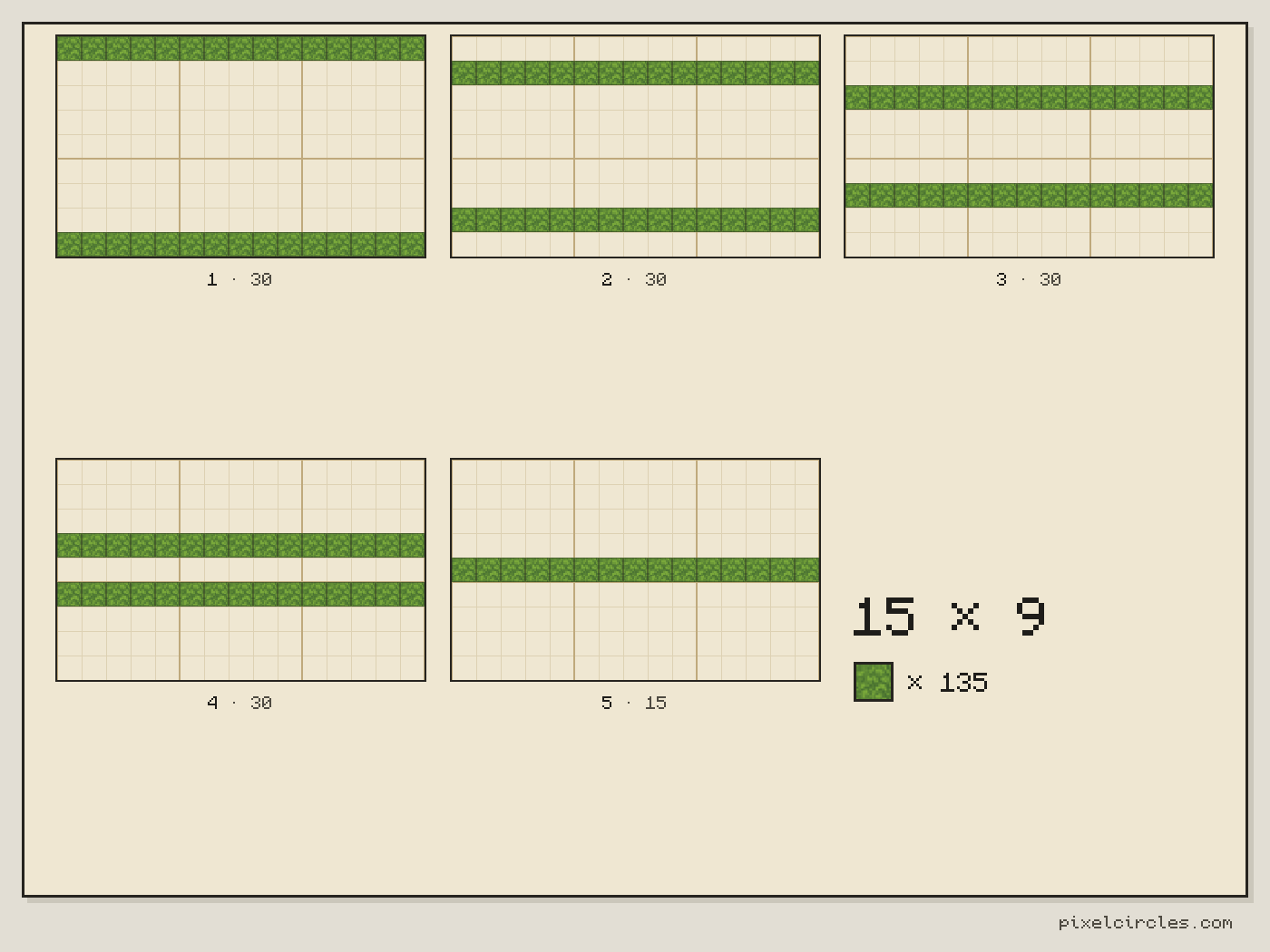
A Minecraft gable roof on a 15 × 9 base takes 135 blocks and rises 5 layers; a barrel-vault curved roof on the same base takes 195. This Minecraft roof generator plans gable, hip, pyramid and curved roofs layer by layer, with the blocks in every layer and a Litematica file. A pyramid on a 15 × 15 base takes 225 blocks hollow. Works for Java and Bedrock. Download a .litematic schematic and import it into Minecraft Java with Litematica — build over the hologram in survival or paste it in creative.
Curved roofs follow the arc, so pitch and gable ends don't apply.
| Material | Blocks |
|---|---|
| Stone | 135 |
- Level
- 1 / 5 · Y=0
- This level
- 30
- Total blocks
- 135
- Stacks of 64
- 2 stacks + 7
- Width × depth × height
- 15 × 9 × 5
- Roof height
- 5 blocks
- Placed
- 0 / 135
Click a block to mark it placed.
Readout coordinates: x points east and z south, counted from the centre block; on an even size, 0, 0 is the block just south-east of the centre.
Keys: ↑↓ size · ←→ level · 3 3D view · E tools
For the Litematica mod: put the file in .minecraft/schematics, press M in game, then Load Schematics. The file holds every level.
Row-by-row block counts for this level
| Row | Blocks | Columns with a block |
|---|---|---|
| 1 | 15 | 1–15 |
| 2 | 0 | — |
| 3 | 0 | — |
| 4 | 0 | — |
| 5 | 0 | — |
| 6 | 0 | — |
| 7 | 0 | — |
| 8 | 0 | — |
| 9 | 15 | 1–15 |
How to use
- Set the size and options above the plan.
- Step through the levels, or open the 3D view.
- Download the .litematic, or print the plan.
This Minecraft roof generator turns a length, a width and a roof type into layer plans from the eaves to the ridge. Choose gable, hip or a curved roof, set the pitch, and step through the layers with the slider.
How to build a roof in Minecraft
A roof is a slope, and on a block grid a slope is a set of steps. The Minecraft roof generator works out those steps for you and lays them out one layer at a time, so you can build from the eaves up without measuring. Enter the length and the width of the base, that is the walls the roof sits on, and choose a type. The plan for layer 1 is the outer edge of the roof; each layer above it moves in toward the ridge.
The generator counts whole blocks in a shell one block thick. Stairs and slabs would smooth the slope but do not change where the blocks go, so you can build the plan in full blocks and swap the outer corner of each step for a stair afterwards.
Gable, hip and curved roofs
A gable roof has two slopes that meet in a ridge along the length, and two open triangles at the ends, the gables. Switch on Fill gable ends to close them. A hip roof slopes on all four sides; on a square base it is a pyramid, and on a longer base it ends in a ridge. A curved roof follows a circle: the half version is a barrel vault, half a circle across the width, and the quarter version rises steeply on one long side and flattens toward the other, like a wave.
Minecraft roof pitch
The pitch sets how far the roof steps in for each layer it goes up. Low is one block up for every two across, 45 degrees is one up for one across, and steep is two up for one across. A gable roof on a 15 × 9 base is 3 layers tall at low pitch, 5 at 45 degrees and 10 when steep. The roof is one block thick, so low and 45 degree roofs take one block for every column of the base, and a steep roof takes two.
Step-by-step roof guide
- Measure the base. Enter the length and width of the walls that carry the roof, counting the outer blocks.
- Pick the roof type and, for gable and hip roofs, the pitch.
- Check the height. The stats show the layer count, the total blocks and the number of stacks.
- Build layer 1 along the top of the walls, then press the right arrow or drag the slider for the next layer.
- Close the ridge. The top layer is the ridge line, or the single block at the top of a pyramid.
- Export a PNG of any layer, or the whole roof as a .litematic file.
Block counts for common roof sizes
The table lists gable and hip roofs at 45 degrees on bases builders use often. It also gives the two other numbers people ask about: the gable with both ends filled, and the barrel-vault curved roof.
| Base (length × width) | Gable height | Gable or hip blocks | Hip height | Gable, ends filled | Steep gable blocks | Curved half blocks |
|---|---|---|---|---|---|---|
| 7 × 5 | 3 | 35 | 3 | 43 | 70 | 49 |
| 9 × 7 | 4 | 63 | 4 | 81 | 126 | 81 |
| 11 × 7 | 4 | 77 | 4 | 95 | 154 | 99 |
| 13 × 9 | 5 | 117 | 5 | 149 | 234 | 169 |
| 15 × 9 | 5 | 135 | 5 | 167 | 270 | 195 |
| 21 × 11 | 6 | 231 | 6 | 281 | 462 | 315 |
| 31 × 15 | 8 | 465 | 8 | 563 | 930 | 651 |
Minecraft pyramid calculator
A hip roof on a square base is a pyramid, so this Minecraft roof generator doubles as a pyramid calculator. The table below gives the height of each pyramid, the blocks in the hollow shell, and the blocks in a solid pyramid of the same size. Every number is the layer-by-layer count from the generator, not a formula.
| Square base | Height (layers) | Hollow pyramid blocks | Solid pyramid blocks |
|---|---|---|---|
| 5 × 5 | 3 | 25 | 35 |
| 7 × 7 | 4 | 49 | 84 |
| 9 × 9 | 5 | 81 | 165 |
| 11 × 11 | 6 | 121 | 286 |
| 15 × 15 | 8 | 225 | 680 |
| 21 × 21 | 11 | 441 | 1,771 |
| 31 × 31 | 16 | 961 | 5,456 |
| 51 × 51 | 26 | 2,601 | 23,426 |
Minecraft roof ideas
- Cottages and barns with a steady 45 degree gable roof and filled gable ends.
- Towers and pavilions with a hip roof; on a square base it becomes a pyramid.
- Longhouses and greenhouses with a low gable roof that keeps the height down.
- Train stations and hangars with a half-round barrel vault over a long, wide base; the half-round plan for a base 9 blocks wide rises 5 layers.
- Steep church roofs and A-frame cabins with a steep pitch.
Tips for better roofs
Make the base one block wider than the walls so the roof overhangs, or add the overhang by building the first layer a block outside the wall. An odd width gives a ridge one block wide and an even width gives a ridge two blocks wide. A stair block placed at each step, tall side toward the ridge, turns the stepped slope into a smooth one. For a curved roof, use an odd width for a single-block ridge at the top.
Frequently asked questions
How do I make a roof in Minecraft?
Enter the length and width of the base in the roof generator, pick gable, hip or curved and set the pitch. Build layer 1 on top of the walls, then work up one layer at a time; each layer moves in toward the ridge by the same amount.
How many blocks does a Minecraft roof need?
A gable roof on a 15 × 9 base at 45 degrees takes 135 blocks, or 167 with both gable ends filled. A hip roof on the same base takes 135, and a steep gable takes 270. The Stats panel gives the exact total and the number of stacks of 64.
How do I build a curved roof in Minecraft?
The Minecraft curved roof generator is the Curved option in the roof type list. Choose Curved (half) for a barrel vault or Curved (quarter) for a roof that rises steeply on one side. The plan for each layer shows which rows have blocks; on a 15 × 9 base the half roof takes 195 blocks over 5 layers and the quarter roof 180 over 9 layers.
How do I use the Minecraft pyramid calculator?
Choose Hip and enter the same number for length and width. A 15 × 15 base gives a pyramid 8 layers tall that takes 225 blocks hollow or 680 blocks solid. The table on this page lists other sizes.
What pitch should a Minecraft roof have?
45 degrees is the classic Minecraft look and the easiest to build with stairs. Low pitch, one up for two across, suits long low buildings; steep, two up for one across, suits towers and churches.
Can I download the roof for Litematica?
Yes. Choose a block and press .litematic in the tools. The file holds every layer of the roof. Put it in .minecraft/schematics, press M in the game and load it. The plan uses full blocks; add stairs by hand if you want a smooth slope.
Can I import this build straight into Minecraft?
Yes, on Java Edition with the Litematica mod. Install Fabric and MaLiLib, put the .litematic file in .minecraft/schematics, then press M → Load Schematics in Minecraft. In survival, the build appears as a translucent hologram and you place blocks over it; Easy Place can place one block at a time from the projection. In creative, Litematica can paste the whole build into your world; on a server you need administrator (op) permission. Bedrock Edition cannot use .litematic files, so follow the grid and layer plans instead.