 PixelCircles
Minecraft Wall Designs Generator
These minecraft wall designs turn a wall idea into a buildable plan. Choose a castle wall, desert wall, nether fortress wall, garden wall or wood palisade, then change its length, height, thickness, materials, gate, pillars and arrow slits. The generator counts every block, shows each layer and a 3D view, and exports a Litematica file. Download a .litematic schematic and import it into Minecraft Java with Litematica — build over the hologram in survival or paste it in creative.
| Material | Blocks |
|---|---|
| Stone Bricks | 728 |
| Cobblestone | 50 |
- Level
- 1 / 14 · Y=0
- This level
- 56
- Total blocks
- 778
- Stacks of 64
- 12 stacks + 10
- Width × depth × height
- 32 × 3 × 14
- Wall size
- 32 × 12 × 2
- Top style
- Battlements
- Total height
- 14 blocks
- Placed
- 0 / 778
Click a block to mark it placed.
Readout coordinates: x points east and z south, counted from the centre block; on an even size, 0, 0 is the block just south-east of the centre.
Keys: ↑↓ size · ←→ level · 3 3D view · E tools
For the Litematica mod: put the file in .minecraft/schematics, press M in game, then Load Schematics. The file holds every level.
Row-by-row block counts for this level
| Row | Blocks | Columns with a block |
|---|---|---|
| 1 | 25 | 1–13, 21–32 |
| 2 | 25 | 1–13, 21–32 |
| 3 | 6 | 1–2, 9–10, 25–26 |
How to use
- Set the size and options above the plan.
- Step through the levels, or open the 3D view.
- Download the .litematic, or print the plan.
A wall is more than a rectangle: its base, repeating pillars, openings and top profile decide whether it reads as a castle wall, a garden boundary or a frontier palisade. Start from a preset, adjust one number at a time and use the plan as a Minecraft wall generator for Java or Bedrock.
How to build a wall in Minecraft
Begin with the footprint. Length is the number of blocks from the first end pillar to the last, height is the solid wall body, and thickness is the depth you will see in the 3D view. A long, thin wall is quick to gather and works as a property boundary. A two- or three-block wall feels defensive and leaves room for a gate passage or a walkway. The layer plan is the useful part of the drawing: each square is one block seen from above, one layer at a time from the ground up, while the 3D window shows the whole wall with its pillars, gate and top.
Pick a material family before you decorate. Stone bricks make a dependable castle wall; cobblestone gives a rough garden edge; sandstone suits a desert base; nether bricks and red nether-brick pillars make a fortress; oak logs turn the same plan into a wooden palisade. The material list is generated from the exact scene, so the number beside each block and the number of stacks agree with the export.
Wall ideas: battlements, walkways and flat caps
Battlements alternate a raised block with a gap along the front edge and keep a solid rear course. They are the classic castle wall profile. A guarded walkway puts a one-block guard wall on the outer front edge and leaves the wall behind it open as a walking strip. A sloped cap keeps the wall-thickness course and overhangs one block at both the front and back; Minecraft stairs can replace those full blocks after the structural wall is placed. Flat tops are intentionally plain, useful for a low garden wall, a bridge connection or a palisade that will get fences and torches later.
Columns break up repetition. Set pillar spacing from four to sixteen blocks and pillar width from one to three. Every pillar starts at the base, projects one block beyond the wall depth and rises one block above the wall top. Use a contrasting material for readable stripes, or keep the material the same for a quiet stone-brick rhythm. The bottom course is a separate material band: one layer is subtle, two layers look like a plinth, and three layers suit a heavy gatehouse.
Castle wall gates and arrow slits
The centre gate reuses the arch engine, so its opening is mirrored and its curve remains symmetrical when the length changes. Gate width means the clear span; the ring around it stays part of the wall. Arrow slits are one-block vertical openings through the middle of the wall, repeated at the spacing you choose and skipped where they would collide with the gate. For a walkable castle wall, check the clear opening in the plan before gathering blocks, then add a door, portcullis or stairs by hand as a finishing layer.
These are structural Minecraft wall designs rather than furnished castles. The generator counts full blocks, treats a sloped cap and palisade points as full blocks, and leaves trapdoors, fences, stairs, lighting and interior rooms for your own style. That keeps every preset reproducible while leaving plenty of room for decoration.
| Design | Size | Blocks | Stacks | Wall material | Top |
|---|---|---|---|---|---|
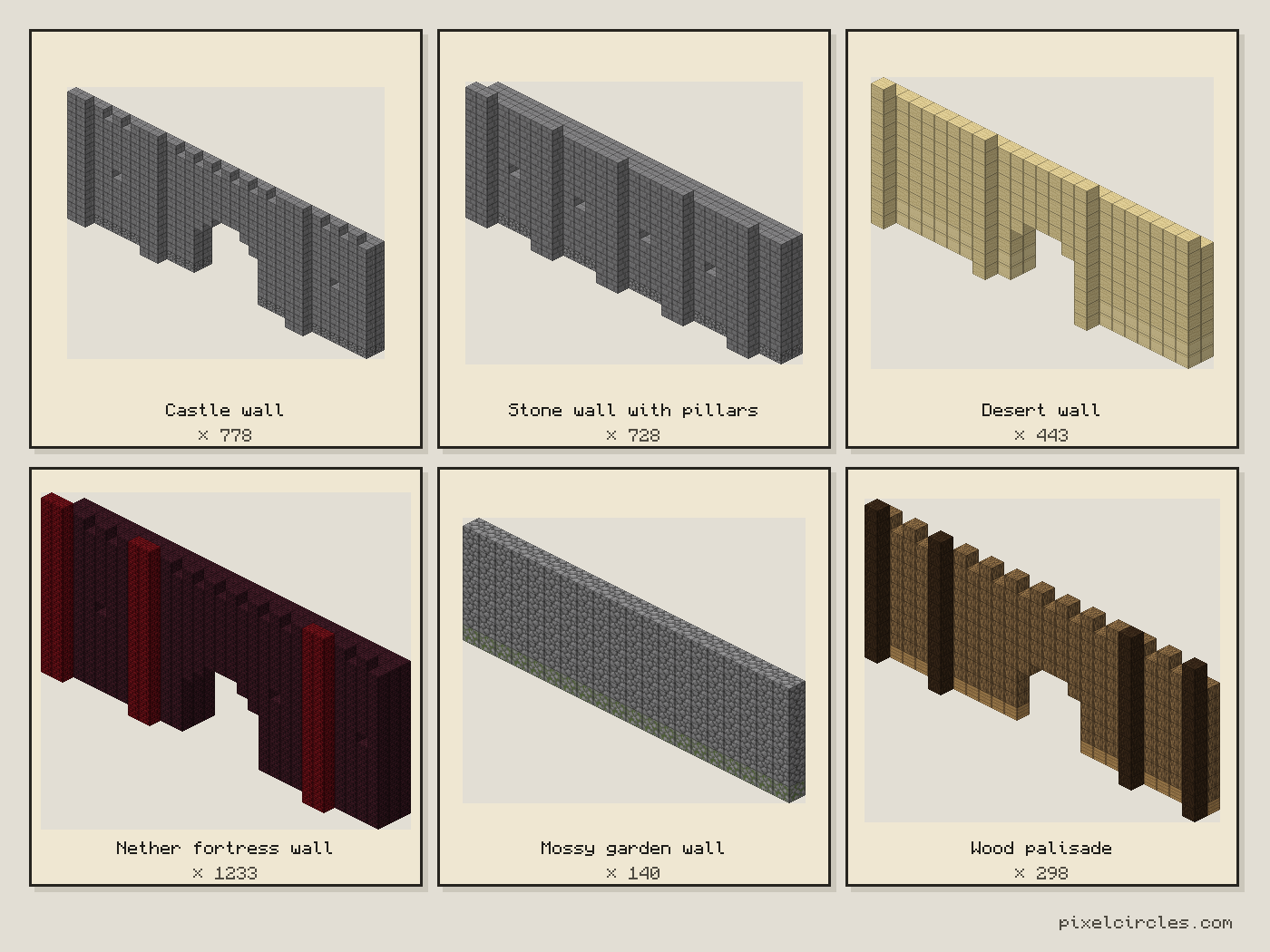
| Castle wall | 32 × 12 × 2 | 778 | 12 stacks + 10 | Stone Bricks 728 | Battlements |
| Stone wall with pillars | 28 × 10 × 2 | 728 | 11 stacks + 24 | Stone Bricks 672 | Flat top |
| Desert wall | 24 × 9 × 2 | 443 | 6 stacks + 59 | Sandstone 367 | Guarded walkway |
| Nether fortress wall | 30 × 14 × 3 | 1,233 | 19 stacks + 17 | Nether Bricks 1,137 | Battlements |
| Mossy garden wall | 20 × 6 × 1 | 140 | 2 stacks + 12 | Cobblestone 120 | Flat top |
| Wood palisade | 26 × 10 × 1 | 298 | 4 stacks + 42 | Oak Log 229 | Battlements |
Six Minecraft wall designs
Castle wall is the balanced starting point: stone bricks, a crenellated top, regular pillars and a central arched gate. Stone wall with pillars removes the gate and keeps a clean flat top for a straight defensive run. Desert wall swaps in sandstone with a cut-sandstone base, a guarded top and a smaller gate. Nether fortress wall is taller and thicker, using red nether-brick pillars against nether bricks. Mossy garden wall is low and compact, with no openings and a flat cap for paths and courtyards. Wood palisade uses logs and a repeating top silhouette; replace the full cap blocks with pointed fences if you want sharper stakes.
A practical wall-generator workflow
- Choose a preset. Start with the silhouette closest to your build.
- Set length and height. Keep the wall within the available materials and the terrain line.
- Choose thickness and top. Use two blocks for most castle walls and a flat cap for garden boundaries.
- Place pillars and the base. A repeated spacing makes the wall easier to build in sections.
- Check openings. Confirm the gate is centred and arrow slits do not overlap it.
- Export. Download the Litematica file or copy the block list into a resource run.
For a bigger compound, build one wall section, then repeat it around the perimeter and add towers at the corners. Link this plan to the Minecraft tower generator for corner towers, the arch generator for separate gate frames, and the stack calculator when you turn the total into shulker boxes.
Frequently asked questions
What is the best Minecraft wall design?
The Castle wall preset is a reliable all-purpose design: stone bricks, battlements, pillars, a base course and a centred arched gate. Change the material or top style to match your build.
How do I make a castle wall in Minecraft?
Choose Castle wall, set the length and height, then build it layer by layer from the ground up. The 3D view shows the thickness, pillars and gate opening; the material table gives the exact stacks.
How thick should a Minecraft wall be?
One block is enough for a boundary. Two blocks is a good default for a castle wall, and three blocks gives a heavier fortress section or room for a walkable edge.
Can I add a gate and arrow slits?
Yes. The centre gate uses a symmetrical arch opening, and arrow slits repeat through the middle of the wall at your chosen spacing. Slits that would overlap the gate are skipped.
Does the wall generator export a Litematica file?
Yes. Set the dimensions and materials, open the tools tray and download .litematic. The same scene powers the layer plan, the 3D view, the block counts and the palette, so the file matches the numbers on the page.
Are stairs and slabs counted in the wall designs?
No. Every block is counted as a full block, including the sloped cap and the points of the palisade. In game you can swap those for stairs, slabs or fences for more detail; each swap is one for one, so the totals stay right.
How many blocks does a castle wall need?
The Castle wall preset, 32 blocks long, 12 high and 2 thick with battlements, pillars every 8 blocks and a 7-wide gate, takes 778 blocks (12 stacks + 10). A low mossy garden wall is 140 blocks and the nether fortress wall 1,233. Length, height, thickness, pillars, openings and the top all change the total; the stats bar recounts it for any setting.
Can I import this build straight into Minecraft?
Yes, on Java Edition with the Litematica mod. Install Fabric and MaLiLib, put the .litematic file in .minecraft/schematics, then press M → Load Schematics in Minecraft. In survival, the build appears as a translucent hologram and you place blocks over it; Easy Place can place one block at a time from the projection. In creative, Litematica can paste the whole build into your world; on a server you need administrator (op) permission. Bedrock Edition cannot use .litematic files, so follow the grid and layer plans instead.