 PixelCircles
Minecraft Lighthouse
This Minecraft lighthouse generator turns a base diameter, taper and height into a complete build. The classic preset is 1,669 blocks, or about 27 stacks, and includes the gallery, glass lantern room, roof and lights. Use the layer plans as lighthouse blueprints, then download a Litematica file for the whole build. Download a .litematic schematic and import it into Minecraft Java with Litematica — build over the hologram in survival or paste it in creative.
| Material | Blocks |
|---|---|
| Stone Bricks | 587 |
| White Concrete | 528 |
| Red Concrete | 449 |
| Oak Fence | 36 |
| Glass | 64 |
| Sea Lantern | 5 |
- Level
- 1 / 43 · Y=0
- This level
- 225
- Total blocks
- 1,669
- Stacks of 64
- 26 stacks + 5
- Width × depth × height
- 17 × 17 × 43
- Tower top
- 9 blocks
- Colour bands
- 5
- Total height
- 43 blocks
- Foundation · Stone Bricks
- 7 stacks + 2 (450 blocks)
- Tower · White Concrete
- 8 stacks + 16 (528 blocks)
- Tower · Red Concrete
- 5 stacks + 24 (344 blocks)
- Gallery deck · Stone Bricks
- 2 stacks + 9 (137 blocks)
- Gallery railing · Oak Fence
- 36 blocks
- Lantern room · Glass
- 1 stack (64 blocks)
- Lamp · Sea Lantern
- 4 blocks
- Roof · Red Concrete
- 1 stack + 41 (105 blocks)
- Top light · Sea Lantern
- 1 block
- Placed
- 0 / 1,669
Click a block to mark it placed.
Readout coordinates: x points east and z south, counted from the centre block; on an even size, 0, 0 is the block just south-east of the centre.
Keys: ↑↓ size · ←→ level · 3 3D view · E tools
For the Litematica mod: put the file in .minecraft/schematics, press M in game, then Load Schematics. The file holds every level.
Row-by-row block counts for this level
| Row | Blocks | Columns with a block |
|---|---|---|
| 1 | 5 | 7–11 |
| 2 | 9 | 5–13 |
| 3 | 13 | 3–15 |
| 4 | 13 | 3–15 |
| 5 | 15 | 2–16 |
| 6 | 15 | 2–16 |
| 7 | 17 | 1–17 |
| 8 | 17 | 1–17 |
| 9 | 17 | 1–17 |
| 10 | 17 | 1–17 |
| 11 | 17 | 1–17 |
| 12 | 15 | 2–16 |
| 13 | 15 | 2–16 |
| 14 | 13 | 3–15 |
| 15 | 13 | 3–15 |
| 16 | 9 | 5–13 |
| 17 | 5 | 7–11 |
How to use
- Set the size and options above the plan.
- Step through the levels, or open the 3D view.
- Download the .litematic, or print the plan.
A lighthouse is more than a circle tower. It needs a foundation that sits squarely on the ground, a wall that narrows without drifting off centre, a gallery you can walk around, a glass lantern room and a roof that reads clearly from the sea. Set those pieces here and the generator lays them out from bottom to top.
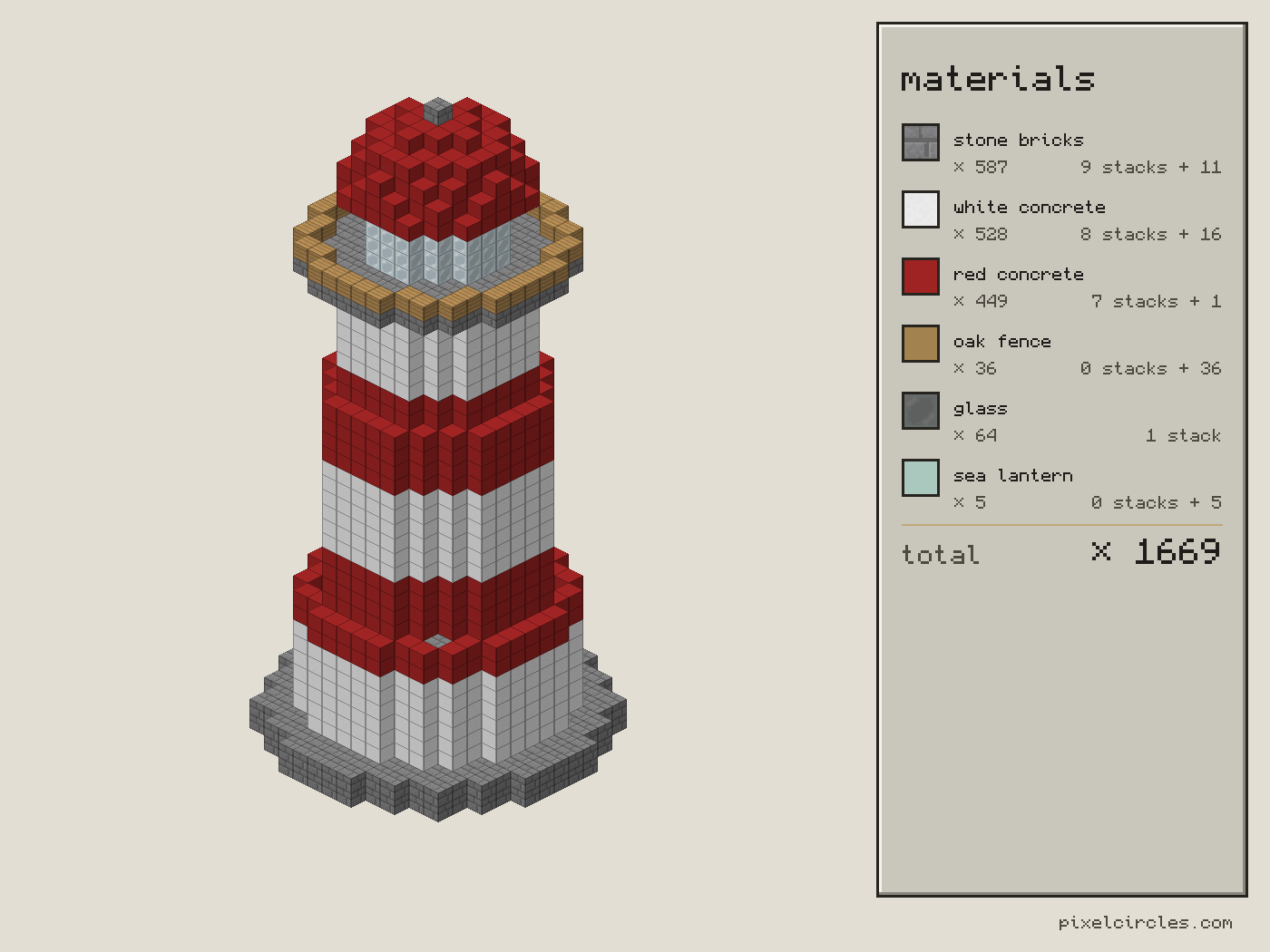
How to build a lighthouse in Minecraft
To build a Minecraft lighthouse, start with a centre line: mark the column where the light should stand and keep it until the roof is finished. Choose a square foundation for a strong architectural base or a round one when the tower should flow into the shore; turn it off for a lighthouse on an existing pier. This Minecraft lighthouse build stays centred from foundation to lantern, so the blueprint remains reliable at every layer.
Choose the base and top diameters before you choose the height. A base that is 13 blocks wide and a top of 9 gives a readable taper without making the upper gallery cramped. The wall steps in by one block on each side only when the outline can stay centred; it never makes a surprise jog on one side. That is the useful difference between a Minecraft lighthouse build made from a plan and one copied from a picture. Each layer tells you the exact ring to place, including the number of blocks in the ring.
Lighthouse plans and colour bands
Colour bands make a lighthouse visible at distance. Set Band height to six for the familiar red-and-white pattern: six layers of the first concrete, six of the second, then repeat. Set it to zero for a single-material stone lighthouse. The materials are real block IDs, so the download and the browser plan agree: white concrete is white concrete in the Litematica palette, not a made-up colour name. Try black and yellow for a harbour beacon, or sandstone and red sandstone for a desert coast.
The gallery is deliberately separate from the tower wall. Its solid deck is four blocks wider than the top, leaving a ledge for a fence railing. The railing is a thin ring, not a filled platform, so the walk around the lantern remains open. The glass lantern is a hollow circle two blocks narrower than the gallery. Inside it the generator places a compact sea-lantern core on every lantern level, then adds an optional top light above the roof. These are the four features that make a working lighthouse rather than a striped tower.
How to use the lighthouse blueprint
- Build the foundation. Place the first plan on the ground and check its centre against your marker.
- Follow the wall upward. Change the layer slider one level at a time. The colour of each ring is shown in the material table.
- Place the gallery. The wide deck is the walking level. Add the fence railing before the glass room.
- Fill the lantern. The glass ring is hollow and the light blocks sit in its middle. Keep the inside clear if you want to replace them with a redstone lamp.
- Cap the roof. A dome is softer and traditional; a cone is sharper and easier to spot from far away.
For a survival build, copy the material totals into the Minecraft stack calculator before you travel to the site. It tells you how many full stacks and shulker boxes to carry. For a collaborative build, give the foundation and tower to one player, the gallery and glass to another, and use the layer numbers as a shared checklist.
| Preset | Blocks | Stacks | Material 1 | Material 2 | Material 3 |
|---|---|---|---|---|---|
| Small lighthouse | 777 | 13 | 371 | 280 | 58 |
| Classic red and white | 1,669 | 27 | 587 | 528 | 449 |
| Tall tower | 3,207 | 51 | 1,128 | 1,019 | 938 |
Small and tall Minecraft lighthouses
The Small lighthouse preset is a useful starter for a river mouth or a compact harbour. The Classic red and white preset has enough height for a real gallery walk and a readable beacon room. The Tall tower preset stretches the wall to the skyline and uses a square foundation, which gives it a strong silhouette against cliffs. Open a preset, then change only one number at a time; the build remains a complete building while you explore.
Use the 3D view to inspect the silhouette before you commit. It shows the whole scene, including the roof, fence, glass and light, rather than only the current layer. The layer plan is still the authority for placing blocks. Download the .litematic file when you are happy, load it with Litematica, and build against the hologram. The PNG is useful as a printed lighthouse tutorial or a second-screen reference next to the game.
Lighthouse design tips
Keep the lantern slightly smaller than the gallery so the fence remains visible. Use a darker roof than the bands to give the top a clean outline. If the tower is beside a cliff, a square foundation can be rotated into the terrain while the circular tower still reads as a lighthouse. For a tiny build, turn off the foundation and the top light, then use a cone roof; for a landmark, choose the tallest preset, a contrasting band pair and a dome roof.
Every count in the table and every row in the plan comes from the same engine as the interactive tool. There is no image estimate hidden behind the prose: the totals include overlaps only once, list glass and fence separately, and count the light blocks. That makes these lighthouse plans practical for a resource run, a build server shopping list or a Litematica schematic.
Frequently asked questions
What is a Minecraft lighthouse generator?
It is a layer-by-layer building planner for a tapered lighthouse. This Minecraft lighthouse generator combines a foundation, striped tower, gallery, fence railing, glass lantern, light blocks and a dome or cone roof.
How do I make a working lighthouse in Minecraft?
Build the tower from the plan, leave the glass lantern room open inside, and place the sea-lantern core shown by the light layers. Add a redstone lamp instead if you want a switchable beacon; the generator's light blocks mark the centre.
Can I get lighthouse blueprints or a Litematica file?
Yes. The layer plan is a blueprint for every Y level and the tools tray downloads a .litematic file for the complete lighthouse. The material list uses real Minecraft block names.
How tall should a Minecraft lighthouse be?
Fourteen blocks makes a compact small lighthouse, about thirty gives a classic harbour landmark, and fifty-six makes a tall coastal tower. The presets let you start at each scale and then adjust the height.
How do the colour bands work?
Band height is the number of tower layers before the two selected materials swap. Set it to zero for one colour, or six to make the classic red-and-white lighthouse pattern.
What is the gallery for?
The gallery is the wider deck below the lantern. Its fence railing leaves a walkable outside edge, so the glass room is separated from the tapered wall and the lighthouse reads correctly from below.
How many blocks does the classic lighthouse need?
The classic preset uses 1,669 blocks, about 27 stacks of 64. The table breaks the total into its largest material groups, and the stack calculator can turn any changed total into shulker boxes.
Can I import this build straight into Minecraft?
Yes, on Java Edition with the Litematica mod. Install Fabric and MaLiLib, put the .litematic file in .minecraft/schematics, then press M → Load Schematics in Minecraft. In survival, the build appears as a translucent hologram and you place blocks over it; Easy Place can place one block at a time from the projection. In creative, Litematica can paste the whole build into your world; on a server you need administrator (op) permission. Bedrock Edition cannot use .litematic files, so follow the grid and layer plans instead.