 PixelCircles
Minecraft Castle Tower Generator
This Minecraft tower generator makes a complete build instead of a single ring. The wizard tower preset is 1,206 blocks, about 19 stacks, with 4 floors and an embedded spiral staircase. Choose a round, square or octagonal plan, open windows by side, and finish with battlements, a spire, a dome or a flat roof. Download a .litematic schematic and import it into Minecraft Java with Litematica — build over the hologram in survival or paste it in creative.
The spire height only applies to a spire top.
| Material | Blocks |
|---|---|
| Stone Bricks | 689 |
| Oak Planks | 132 |
| Oak Stairs | 72 |
- Level
- 1 / 26 · Y=0
- This level
- 33
- Total blocks
- 893
- Stacks of 64
- 13 stacks + 61
- Width × depth × height
- 11 × 11 × 26
- Tower top
- 9 blocks
- Floors
- 3
- Stairwell
- 7 blocks
- Total height
- 26 blocks
- Tower wall · Stone Bricks
- 9 stacks + 32 (608 blocks)
- Floors · Oak Planks
- 2 stacks + 4 (132 blocks)
- Spiral staircase · Oak Stairs
- 1 stack + 8 (72 blocks)
- Roof deck · Stone Bricks
- 1 stack + 1 (65 blocks)
- Battlements · Stone Bricks
- 16 blocks
- Placed
- 0 / 893
Click a block to mark it placed.
Readout coordinates: x points east and z south, counted from the centre block; on an even size, 0, 0 is the block just south-east of the centre.
Keys: ↑↓ size · ←→ level · 3 3D view · E tools
For the Litematica mod: put the file in .minecraft/schematics, press M in game, then Load Schematics. The file holds every level.
Row-by-row block counts for this level
| Row | Blocks | Columns with a block |
|---|---|---|
| 1 | 5 | 4–8 |
| 2 | 2 | 3, 9 |
| 3 | 2 | 2, 10 |
| 4 | 2 | 1, 11 |
| 5 | 4 | 1, 8–9, 11 |
| 6 | 5 | 1, 7–9, 11 |
| 7 | 2 | 1, 11 |
| 8 | 2 | 1, 11 |
| 9 | 2 | 2, 10 |
| 10 | 2 | 3, 9 |
| 11 | 5 | 4–8 |
How to use
- Set the size and options above the plan.
- Step through the levels, or open the 3D view.
- Download the .litematic, or print the plan.
A tower only becomes useful when the inside and outside agree. This planner keeps the shell centred as it narrows, cuts windows through the wall, opens each floor above the stair steps and puts the chosen top on the correct footprint. Every layer is a plan you can build, mark and export.
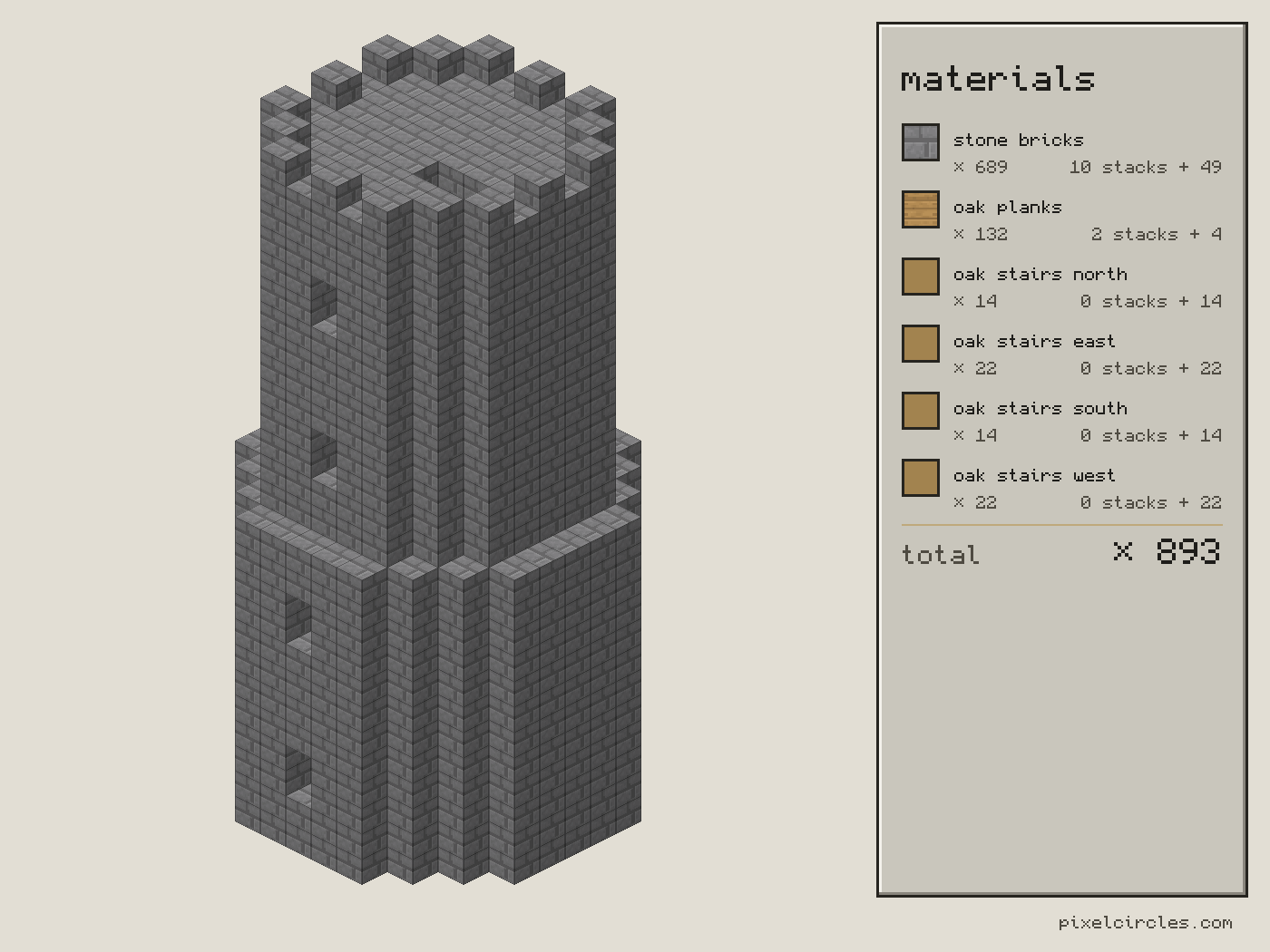
How to build a tower in Minecraft
Start by choosing between a Minecraft castle tower and a Minecraft round tower. A castle tower is usually square, so it locks into castle walls and makes rooms easier to furnish; a round tower gives a smooth silhouette for a wizard tower or turret. The generator can produce both: choose a square plan with Battlements for a castle tower, or choose a round plan for a round tower, then adjust the footprint and roof. The generator draws each plan inside a square bounding box, so the centre remains fixed when the wall tapers.
Set the base width, top width and height together. A tall wall with a top that is much narrower becomes a strong keep; a short wall with the same top width reads as a gatehouse. The taper moves in by one block on each side only at a layer where the parity still matches the base. That prevents the common Minecraft tower problem where the top drifts half a block to one side. The level slider shows the exact shell for each height and the stats panel gives the total.
Floors, windows and spiral stairs
Floor every controls how often the tower gets an oak-plank floor. The engine leaves a two-block headroom above every stair step and opens the slab over the stairwell, so the floor is solid everywhere else. Set zero for a hollow display tower, or use six to eight levels for rooms that feel comfortable in survival. Window sides counts from south, north, east and west. A value of two gives a matched pair; four makes a watchtower with a view in every direction. The windows are carved from the wall rather than placed as a dark sticker on top of it.
Turn on Spiral stairs to reuse the walkable staircase engine inside the tower. It picks the widest stairwell that fits at every tapered level, then places a wedge of oak stairs on each level. The staircase is included in the material list and in the .litematic palette. If the tower is too narrow at the top, the tool explains that the stairwell has no room instead of drawing a broken staircase. For a narrow castle tower, turn stairs off and add ladders or a bubble column by hand.
Tower roofs and castle tops
Choose Battlements for a crenellated castle tower: the roof deck is a solid floor and the crown alternates blocks around its edge. Choose Spire for a pointed wizard tower roof. The spire overhangs by one block and follows the same plan shape as the wall, so a square tower gets a square-eaved point and an octagonal tower keeps its facets. Dome is a hollow rounded cap that works for observatories; Flat is a clean roof deck for a flag, a beacon or a bridge to another building.
Roof block and wall block are separate controls. Stone bricks and cobblestone suit a fortress, spruce planks warm up a watchtower and sandstone works for a desert keep. Because the palette is made from real block IDs, the plan, material table, PNG and Litematica download all name the same blocks.
| Preset | Blocks | Stacks | Wall | Stairs |
|---|---|---|---|---|
| Wizard tower | 1,206 | 19 | 808 | 60 |
| Castle tower | 1,316 | 21 | 868 | 127 |
| Watchtower | 593 | 10 | 444 | 44 |
Wizard, castle and watchtower presets
The Wizard tower is tall, round and capped by a steep spire. Its windows and spiral stairs make it a playable home rather than a hollow cone. The Castle tower is wider inside, square in plan and finished with battlements, so it can meet a wall without awkward corner gaps. The Watchtower is shorter, octagonal and open to four sides, a useful lookout for a survival base or a frontier road. Use each preset as a reliable starting point, then change one control and watch the 3D view update.
Step-by-step tower tutorial
- Place the base plan. Check the centre and the first wall ring before building upward.
- Build the shell. Move through the levels, placing the wall material and leaving the window holes open.
- Add floors. The floor levels are marked in the plan; keep the stair opening clear.
- Run the stairs. Place each stair wedge in order and test the two-block headroom before closing the next floor.
- Finish the top. Build the deck, battlements, spire or dome, then add a flag, lantern or bridge.
Before gathering resources, send the total to the stack calculator. It converts the tower into stacks, shulker boxes and double chests. The PNG is a quick tower tutorial for a second screen, while the .litematic file gives you a full in-world hologram. The layer plan remains useful when you want to build by hand or split the work between players.
These are architectural plans, not a promise that every stair, slab or trapdoor detail is furnished. The generator counts full blocks and full stair blocks; decoration, doors, glass panes and interior furniture are deliberate v2 additions so the structural count stays honest and reproducible.
Frequently asked questions
What does this Minecraft tower generator make?
It makes a complete structural tower: a round, square or octagonal shell, a taper, optional floors, windows, an embedded spiral staircase and one of four tops.
Can I make a Minecraft wizard tower?
Yes. Choose the Wizard tower preset for a tall round shell, spiral stairs, windows and a pointed spire. Change the wall and roof blocks to match your world.
How do I build a castle tower?
Use the Castle tower preset or choose a square plan with Battlements. Build the shell and floor layers first, then join the roof deck and alternating crown blocks to your castle wall.
Are the spiral stairs walkable?
The stair engine keeps two blocks of headroom above every step and opens the floors over the stairwell. Very narrow towers are told when no stairwell can fit.
How many windows can a tower have?
Window sides ranges from zero to four: south, north, east and west. The chosen sides get openings on each storey where there is enough wall and headroom.
Which tower roof should I choose?
Battlements suit castles, Spire suits wizard towers, Dome makes a rounded observatory cap and Flat gives a simple deck for a flag, beacon or bridge.
How many blocks does the wizard tower need?
The Wizard tower preset uses 1,206 blocks, about 19 stacks. It has 4 floors and 60 stair blocks; the comparison table shows the other presets beside it.
Can I import this build straight into Minecraft?
Yes, on Java Edition with the Litematica mod. Install Fabric and MaLiLib, put the .litematic file in .minecraft/schematics, then press M → Load Schematics in Minecraft. In survival, the build appears as a translucent hologram and you place blocks over it; Easy Place can place one block at a time from the projection. In creative, Litematica can paste the whole build into your world; on a server you need administrator (op) permission. Bedrock Edition cannot use .litematic files, so follow the grid and layer plans instead.