 PixelCircles
Minecraft Map Art Generator
This Minecraft map art generator, or MC map art generator for short, works as a map art maker and an image converter: give it one picture and it returns a block-by-block plan of your map art (often written mapart) in the colours a map can show, plus a .litematic schematic. One map covers 128 × 128 blocks, 16,384 blocks or 256 stacks, and a 2 × 2 wall of maps takes 65,536. Choose the flat method for 60 colours on a one-block floor, or the staircase method for 180 colours and a height table for every column. Import the .litematic into Minecraft Java with Litematica — build over the hologram in survival or paste it in creative.
| Block | Blocks |
|---|
- Maps needed
- –
- Blocks
- –
- Stacks of 64
- –
- Size
- –
- Block types
- –
- Tallest column
- –
- Placed
- 0 / 0
Drop an image on the plan, or click a block to mark it placed. Each map covers 128 × 128 blocks; pick one in Show to see its own blocks.
Everything runs in your browser. The image is never uploaded. Colours are the map colour table of the game, not the block textures, so the plan matches what a map shows.
Keys: ↑↓ maps wide · E tools
For the Litematica mod: put the file in .minecraft/schematics, press M in game, then Load Schematics. The file lays the map art flat on the ground; in Staircase mode the row in front of the plan is a reference row of cobblestone, and the map starts one block behind it.
Height of each column
| Column | Height difference |
|---|
How to use
- Choose an image, or pick a sample.
- Set how many maps wide and tall.
- Download the .litematic, or save the PNG.
Drop an image on the plan, pick how many maps wide and tall the art should be, and the generator matches every pixel to the nearest map colour. The result is a block-by-block plan, a materials list, the number of maps you need and a Litematica file. Nothing is uploaded: the picture stays in your browser.
How the Minecraft map art generator works
Map art is a build that looks like a picture when you view it on a map. A map in the game does not show the textures of blocks. It shows one flat colour for the top block of every column, so the picture you build has to be made of the colours a map knows. This map art maker starts from that colour table, not from the block textures, which is why its preview looks like the map and not like the blocks in the world.
Choose an image, or one of the three samples, and set how many maps wide and tall the art will be, from 1 × 1 up to 4 × 4. The picture is fitted to the maps and every pixel is matched to the closest colour of the palette. With Keep shape the whole picture stays inside the maps and the rest is left empty; with Fill maps the picture covers all of them and the edges are cropped. Dither spreads the colour difference of each pixel to its neighbours, which gives smoother gradients from a limited palette.
Every map covers 128 × 128 blocks. The table shows what a wall of maps needs: the size of the plan, the blocks and the stacks of 64. Click a size to open it in the generator.
| Maps | Wide × tall | Maps in total | Plan size | Blocks | Stacks of 64 |
|---|---|---|---|---|---|
| 1 map | 1 × 1 | 1 | 128 × 128 | 16,384 | 256 |
| 2 maps | 2 × 1 | 2 | 256 × 128 | 32,768 | 512 |
| 4 maps | 2 × 2 | 4 | 256 × 256 | 65,536 | 1,024 |
| 6 maps | 3 × 2 | 6 | 384 × 256 | 98,304 | 1,536 |
| 9 maps | 3 × 3 | 9 | 384 × 384 | 147,456 | 2,304 |
| 8 maps | 4 × 2 | 8 | 512 × 256 | 131,072 | 2,048 |
| 12 maps | 4 × 3 | 12 | 512 × 384 | 196,608 | 3,072 |
| 16 maps | 4 × 4 | 16 | 512 × 512 | 262,144 | 4,096 |
The colours of a Minecraft map
The game has 61 base colours for maps, each with four brightness levels. A shade multiplies every channel of the base colour by 180, 220, 255 or 135 and divides by 255, rounded down. Grass, for example, has the base colour of a light green; its dark shade is #597d27, its normal shade #6d9930 and its bright shade #7fb238. With the transparent colour that makes 248 map colours in all, and the generator uses the 60 base colours that come from a block you can place.
Water is left out. Its shade comes from how deep the water is, not from a block you place, so a plan cannot ask for it. The darkest shade (135) is left out for the same reason: only deep water produces it. That leaves 60 colours with the flat method and 180 with the staircase method. Each colour uses one full block that is easy to get in survival, such as wool, terracotta, a stone or a wood block. The table lists the three shades of each colour.
| ID | Block | Dark | Normal | Bright |
|---|---|---|---|---|
| 1 | Grass Block | #597d27 | #6d9930 | #7fb238 |
| 2 | Sandstone | #aea473 | #d5c98c | #f7e9a3 |
| 3 | Mushroom Stem | #8c8c8c | #ababab | #c7c7c7 |
| 4 | Block of Redstone | #b40000 | #dc0000 | #ff0000 |
| 5 | Packed Ice | #7070b4 | #8a8adc | #a0a0ff |
| 6 | Block of Iron | #757575 | #909090 | #a7a7a7 |
| 7 | Oak Leaves | #005700 | #006a00 | #007c00 |
| 8 | Snow Block | #b4b4b4 | #dcdcdc | #ffffff |
| 9 | Clay | #737681 | #8d909e | #a4a8b8 |
| 10 | Dirt | #6a4c36 | #825e42 | #976d4d |
| 11 | Stone | #4f4f4f | #606060 | #707070 |
| 13 | Oak Planks | #645432 | #7b663e | #8f7748 |
| 14 | Block of Quartz | #b4b1ac | #dcd9d3 | #fffcf5 |
| 15 | Orange Wool | #985924 | #ba6d2c | #d87f33 |
| 16 | Magenta Wool | #7d3598 | #9941ba | #b24cd8 |
| 17 | Light Blue Wool | #486c98 | #5884ba | #6699d8 |
| 18 | Yellow Wool | #a1a124 | #c5c52c | #e5e533 |
| 19 | Lime Wool | #599011 | #6db015 | #7fcc19 |
| 20 | Pink Wool | #aa5974 | #d06d8e | #f27fa5 |
| 21 | Gray Wool | #353535 | #414141 | #4c4c4c |
| 22 | Light Gray Wool | #6c6c6c | #848484 | #999999 |
| 23 | Cyan Wool | #35596c | #416d84 | #4c7f99 |
| 24 | Purple Wool | #592c7d | #6d3699 | #7f3fb2 |
| 25 | Blue Wool | #24357d | #2c4199 | #334cb2 |
| 26 | Brown Wool | #483524 | #58412c | #664c33 |
| 27 | Green Wool | #485924 | #586d2c | #667f33 |
| 28 | Red Wool | #6c2424 | #842c2c | #993333 |
| 29 | Black Wool | #111111 | #151515 | #191919 |
| 30 | Block of Gold | #b0a836 | #d7cd42 | #faee4d |
| 31 | Prismarine Bricks | #409a96 | #4fbcb7 | #5cdbd5 |
| 32 | Block of Lapis Lazuli | #345ab4 | #3f6edc | #4a80ff |
| 33 | Block of Emerald | #009928 | #00bb32 | #00d93a |
| 34 | Podzol | #5b3c22 | #6f4a2a | #815631 |
| 35 | Netherrack | #4f0100 | #600100 | #700200 |
| 36 | White Terracotta | #937c71 | #b4988a | #d1b1a1 |
| 37 | Orange Terracotta | #703919 | #89461f | #9f5224 |
| 38 | Magenta Terracotta | #693d4c | #804b5d | #95576c |
| 39 | Light Blue Terracotta | #4f4c61 | #605d77 | #706c8a |
| 40 | Yellow Terracotta | #835d19 | #a0721f | #ba8524 |
| 41 | Lime Terracotta | #485225 | #58642d | #677535 |
| 42 | Pink Terracotta | #703637 | #8a4243 | #a04d4e |
| 43 | Gray Terracotta | #281c18 | #31231e | #392923 |
| 44 | Light Gray Terracotta | #5f4b45 | #745c54 | #876b62 |
| 45 | Cyan Terracotta | #3d4040 | #4b4f4f | #575c5c |
| 46 | Purple Terracotta | #56333e | #693e4b | #7a4958 |
| 47 | Blue Terracotta | #352b40 | #41354f | #4c3e5c |
| 48 | Brown Terracotta | #352318 | #412b1e | #4c3223 |
| 49 | Green Terracotta | #35391d | #414624 | #4c522a |
| 50 | Red Terracotta | #642a20 | #7a3327 | #8e3c2e |
| 51 | Black Terracotta | #1a0f0b | #1f120d | #251610 |
| 52 | Crimson Nylium | #852122 | #a3292a | #bd3031 |
| 53 | Crimson Planks | #682c44 | #7f3653 | #943f61 |
| 54 | Crimson Hyphae | #401114 | #4f1519 | #5c191d |
| 55 | Warped Nylium | #0f585e | #126c73 | #167e86 |
| 56 | Warped Planks | #286462 | #327a78 | #3a8e8c |
| 57 | Warped Hyphae | #3c1f2b | #4a2535 | #562c3e |
| 58 | Warped Wart Block | #0e7f5d | #119b72 | #14b485 |
| 59 | Deepslate | #464646 | #565656 | #646464 |
| 60 | Block of Raw Iron | #987b67 | #ba967e | #d8af93 |
| 61 | Verdant Froglight | #597569 | #6d9081 | #7fa796 |
Flat or staircase map art
A map shades a pixel by comparing its block with the block north of it. If the block is at the same height, the pixel shows the normal shade. If it is higher than the block to the north, the pixel is brighter; if it is lower, darker. That gives two ways to build.
Flat puts every block at one height, so every pixel is the normal shade: 60 colours, a one-block-thick build and no height to track. It is the quick way and works well for logos, pixel art and pictures with flat colours. Staircase raises and lowers the blocks along each column to get the dark and bright shades too: 180 colours, smoother gradients and photos that look right. The price is height: each column climbs and falls, and the generator gives you the height difference of every column in a table under the plan.
How to make map art in Minecraft, step by step
- Load the picture and set the number of maps. Try Keep shape first and Fill maps if the picture has an empty border.
- Pick flat or staircase. The stats show the tallest column in a staircase build, and warn you when it does not fit the world height of 384 blocks.
- Read the materials list. It gives the blocks in stacks of 64, most used first, and how many maps you need.
- Build it from the plan, working north to south. In Show, pick one map at a time and click blocks to mark them as placed.
- Or paste it with Litematica. Download the .litematic file and load it in the mod. In staircase mode it includes a reference row in front of the art.
- Make the map. Craft an empty map, use it over the build and lock it in a cartography table with a glass pane so it stops changing.
Tips for better map art
- Start from a picture with strong colours and a simple background. Small photos with fine detail lose it at 128 blocks.
- Use dither for photos and leave it off for logos and pixel art, where clean edges matter more than gradients.
- Build the art in a spot the map can see from above: a block under a roof or a tree does not count, only the top block of each column does.
- For a wall of maps, build all of them in one go. The staircase heights carry across the edge between two maps, so the shading matches.
- For the shapes that go around a picture, see the pixel art generator, which uses the ordinary block colours.
How big is Minecraft map art?
A single map is 128 × 128 blocks: 16,384 blocks, or 256 stacks. The generator plans from 1 × 1 up to 4 × 4 maps, so the biggest picture it makes is 512 × 512 blocks. The table gives the blocks, stacks and shulker boxes (27 stacks each, the last one part full) for common sizes. Click a size to open it in the generator.
| Maps | Wide × tall | Plan size | Blocks | Stacks of 64 | Shulker boxes |
|---|---|---|---|---|---|
| 1 × 1 map | 1 × 1 | 128 × 128 | 16,384 | 256 | 10 |
| 2 × 1 maps | 2 × 1 | 256 × 128 | 32,768 | 512 | 19 |
| 2 × 2 maps | 2 × 2 | 256 × 256 | 65,536 | 1,024 | 38 |
| 3 × 3 maps | 3 × 3 | 384 × 384 | 147,456 | 2,304 | 86 |
| 4 × 4 maps | 4 × 4 | 512 × 512 | 262,144 | 4,096 | 152 |
How to make a map wall in Minecraft
A Minecraft map wall is a grid of item frames with one map in each, so together the maps show one big picture. In Java Edition:
- Set the size. Choose how many maps across and down in the generator. The wall will have the same number of item frames across and down.
- Build the maps one by one. Under Show, pick one map at a time, for example Map 1 (column 1, row 1), and place its blocks.
- Make a map of each build. Use an empty map over the finished art. A new map starts at zoom level 0, which shows a 128 × 128 area.
- Lock each map. In a cartography table, add a glass pane to the map. A locked map stops updating.
- Hang the frames. Put item frames on a wall in a grid of the same size, then place the maps in order: map 1 at the top left, then along each row, matching the column and row numbers the generator shows.
For example, a 3 × 2 wall is 6 maps (384 × 256 blocks) and 6 item frames, and the art takes 98,304 blocks. Open that plan to see the materials list.
Frequently asked questions
How do I make map art in Minecraft?
Load a picture into the map art generator, choose how many maps wide and tall, and build the block plan it gives you. Then craft an empty map, use it over the build and lock it with a glass pane in a cartography table. The map now shows your picture.
How many blocks does one map of map art take?
One map covers 128 × 128 blocks, so a full-size picture takes 16,384 blocks, which is 256 stacks of 64. A 2 × 2 wall takes 65,536 blocks and 4 × 4 takes 262,144, or 4,096 stacks.
What is the difference between flat and staircase map art?
Flat map art is built at one height and shows 60 colours. Staircase map art raises and lowers each column to get a darker and a brighter shade of every colour, 180 colours in all, but the columns are taller and the build is harder.
How many colours can Minecraft map art have?
A map has 248 colour IDs, including four transparent ones. The generator uses 60 colours you can build flat and 180 you can build as a staircase. Water and the darkest shade are left out because they do not come from a block you place.
Why is water not in the map art generator?
The colour of water on a map depends on how deep the water is, not on a block you place, so a plan cannot ask for one shade of it. Leaving it out keeps every colour in the plan buildable.
How tall is a staircase map art build?
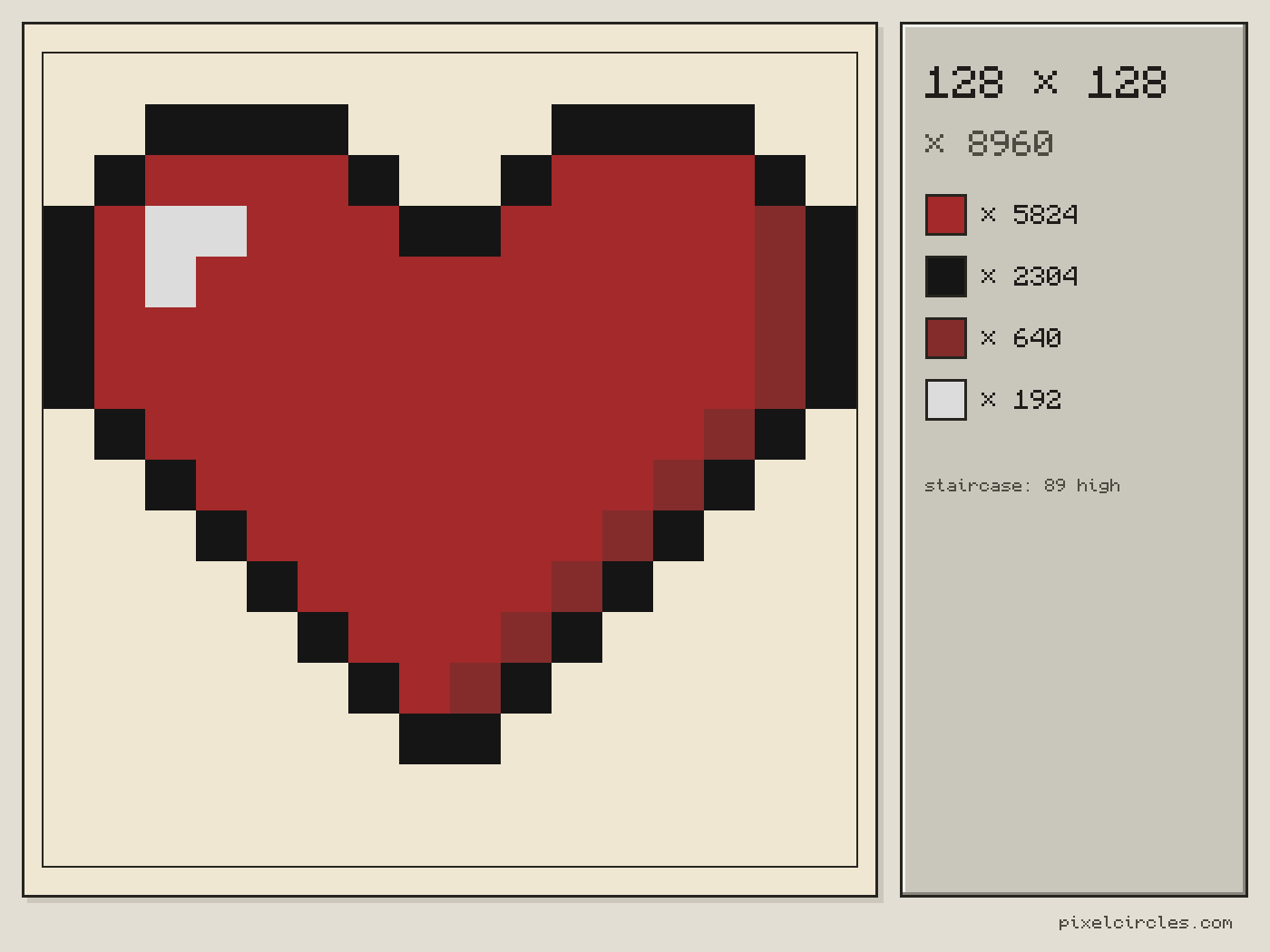
It depends on the picture. The Heart sample as one map takes 8,960 blocks and its tallest column is 89 blocks high. The world is 384 blocks tall, and the generator warns you when a column does not fit.
Can I use the map art in Litematica?
Yes. Press .litematic in the tools to download the plan for what is on screen, all the maps or one. Put the file in .minecraft/schematics, press M in the game and load it. A staircase file has a reference row of cobblestone in front of the art.
Can I import this build straight into Minecraft?
Yes, on Java Edition with the Litematica mod. Install Fabric and MaLiLib, put the .litematic file in .minecraft/schematics, then press M → Load Schematics in Minecraft. In survival, the build appears as a translucent hologram and you place blocks over it; Easy Place can place one block at a time from the projection. In creative, Litematica can paste the whole build into your world; on a server you need administrator (op) permission. Bedrock Edition cannot use .litematic files, so follow the grid and layer plans instead.
Is my image uploaded?
No. The picture is read in your browser and drawn on a canvas to match its colours. It is not sent to a server.
When should I turn on dithering?
Dither mixes neighbouring colours in a pattern to imitate the colours in between. Turn it on for photos. Leave it off for logos and pixel art, where flat colours and clean edges look better.
Can I use the map art generator on Bedrock?
The .litematic file is for Litematica, a mod for Java Edition, so Bedrock cannot load it. Bedrock players can build by hand from the block plan and the materials list; the colours here have not been checked on Bedrock.
How many maps can I make at once?
From 1 × 1 up to 4 × 4 maps (512 × 512 blocks). Keep shape leaves the whole picture inside the maps; Fill maps covers every map and crops the picture's edges.