 PixelCircles
Minecraft Torus Generator
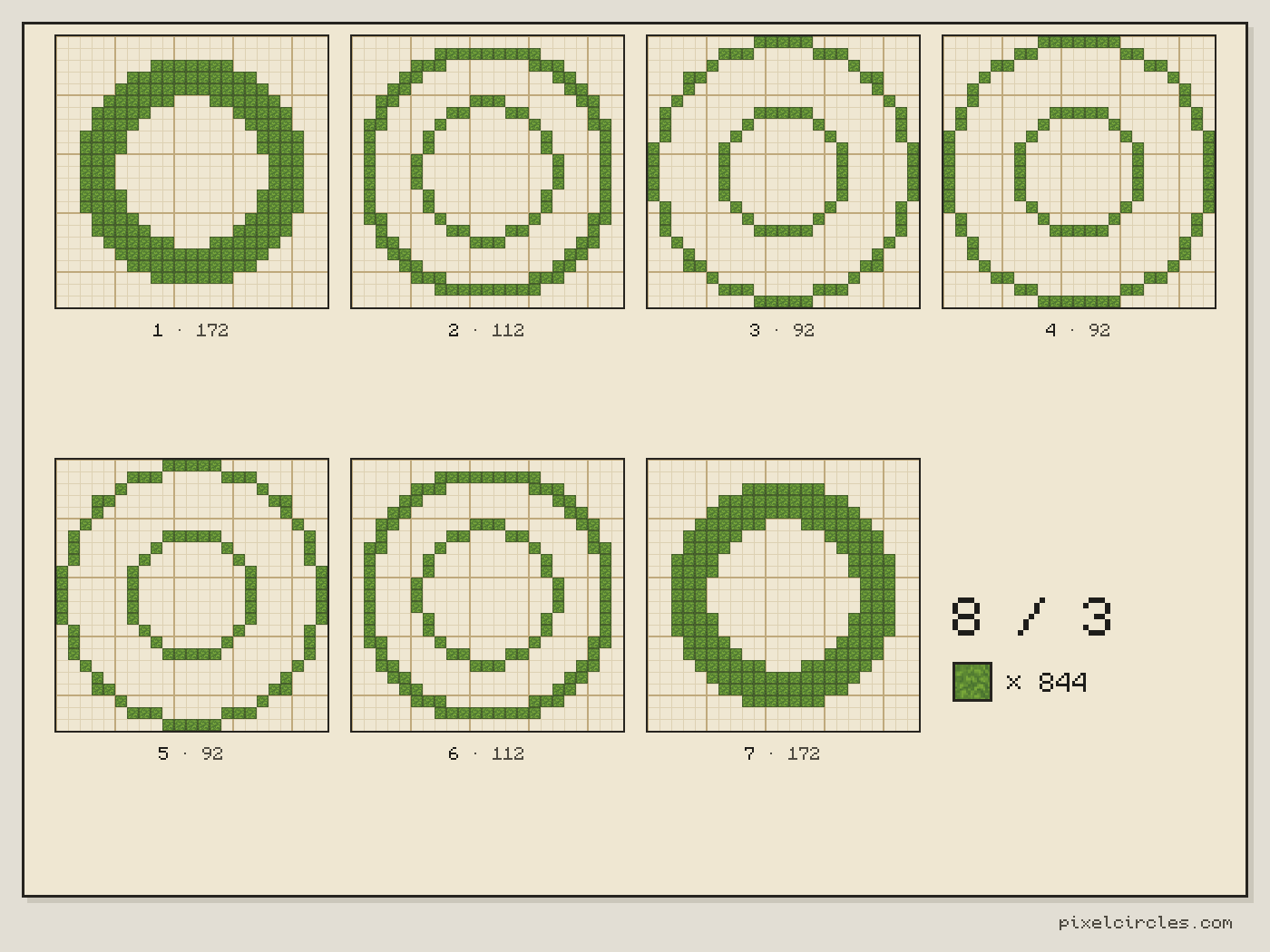
A Minecraft torus with a big radius of 10 and a small radius of 3 is 27 blocks across and 7 tall, with a hole 13 blocks wide. It takes 1,052 blocks hollow or 2,448 solid. This Minecraft torus generator plans any donut or ring layer by layer, with the block count, a 3D preview and a Litematica file. Download a .litematic schematic and import it into Minecraft Java with Litematica — build over the hologram in survival or paste it in creative.
| Material | Blocks |
|---|---|
| Stone | 844 |
- Level
- 1 / 7 · Y=0
- This level
- 172
- Total blocks
- 844
- Stacks of 64
- 13 stacks + 12
- Width × depth × height
- 23 × 23 × 7
- Outer width
- 23 blocks
- Tube width
- 7 blocks
- Hole width
- 9 blocks
- Placed
- 0 / 844
Click a block to mark it placed.
Readout coordinates: x points east and z south, counted from the centre block; on an even size, 0, 0 is the block just south-east of the centre.
Keys: ↑↓ size · ←→ level · 3 3D view · T style · E tools
For the Litematica mod: put the file in .minecraft/schematics, press M in game, then Load Schematics. The file holds every level.
Row-by-row block counts for this level
| Row | Blocks | Columns with a block |
|---|---|---|
| 1 | 0 | — |
| 2 | 0 | — |
| 3 | 7 | 9–15 |
| 4 | 11 | 7–17 |
| 5 | 13 | 6–18 |
| 6 | 12 | 5–10, 14–19 |
| 7 | 10 | 4–8, 16–20 |
| 8 | 8 | 4–7, 17–20 |
| 9 | 8 | 3–6, 18–21 |
| 10 | 8 | 3–6, 18–21 |
| 11 | 6 | 3–5, 19–21 |
| 12 | 6 | 3–5, 19–21 |
| 13 | 6 | 3–5, 19–21 |
| 14 | 8 | 3–6, 18–21 |
| 15 | 8 | 3–6, 18–21 |
| 16 | 8 | 4–7, 17–20 |
| 17 | 10 | 4–8, 16–20 |
| 18 | 12 | 5–10, 14–19 |
| 19 | 13 | 6–18 |
| 20 | 11 | 7–17 |
| 21 | 7 | 9–15 |
| 22 | 0 | — |
| 23 | 0 | — |
How to use
- Set the size and options above the plan.
- Step through the levels, or open the 3D view.
- Download the .litematic, or print the plan.
This Minecraft torus generator turns two radii into a donut, a ring, a halo or a portal frame. Set the big radius, how far the tube sits from the middle, and the small radius, how thick the tube is. Step through the layers from the bottom up, turn the model in 3D, and download the plan.
How the Minecraft torus generator works
A torus is a tube bent into a circle. In Minecraft you know it as a donut, a ring or a lifebuoy. It has two sizes. The big radius is the distance from the middle of the ring to the middle of the tube. The small radius is the radius of the tube itself. A big radius of 64 and a small radius of 32 would be the largest torus this tool draws.
The generator cuts the torus into horizontal layers, the way the sphere generator cuts a ball. On each layer it keeps every block whose centre lies inside the tube, so the plan is a set of rings that grow and shrink as you go up. The bottom layer is a thin ring, the middle layer is the widest and the top layer is a thin ring again.
Press the 3D switch to see the whole model, and the layer scale to look at one layer at a time. The stats give the outer width, the tube width and the width of the hole. Click a radius pair in the table to open it in the generator.
| Big radius | Small radius | Width | Height | Hollow torus | Solid torus | Hole |
|---|---|---|---|---|---|---|
| 4 | 2 | 13 | 5 | 288 | 504 | 3 |
| 6 | 2 | 17 | 5 | 420 | 756 | 7 |
| 8 | 3 | 23 | 7 | 844 | 1,936 | 9 |
| 10 | 3 | 27 | 7 | 1,052 | 2,448 | 13 |
| 12 | 4 | 33 | 9 | 1,696 | 4,876 | 15 |
| 16 | 4 | 41 | 9 | 2,276 | 6,540 | 23 |
| 20 | 5 | 51 | 11 | 3,484 | 12,060 | 29 |
| 24 | 6 | 61 | 13 | 5,008 | 20,200 | 35 |
| 32 | 8 | 81 | 17 | 8,836 | 45,748 | 47 |
| 40 | 10 | 101 | 21 | 13,732 | 87,448 | 59 |
Block centre or corner centre
A torus can be centred on a block or on the corner between four blocks. A block-centred torus has a single middle block, so its width is always odd: 2 × (big + small) + 1. A big radius of 10 and a small radius of 3 gives 27 blocks across and 7 layers tall, which is 1,052 blocks when hollow. The same radii centred on a corner give 26 across and 6 tall, and 880 blocks. Use block centre when you want a middle block to mark; use corner centre when the hole has to be an even number of blocks wide, for example around a two-block-wide pillar.
Hollow and filled tori
Hollow keeps only the blocks that have an open face: a neighbour above, below or to the side that is not part of the torus. It is the shell of the donut, and it takes far fewer blocks. A solid torus with a big radius of 16 and a small radius of 4 takes 6,540 blocks, against 2,276 hollow, which is 35 stacks. Filled is the choice for a torus you plan to cover, to fill with water or to carve later.
How to make a donut in Minecraft, step by step
- Set the big radius for the size of the ring and the small radius for how fat the tube is. A small radius has to leave a hole, so it can be at most the big radius minus one.
- Pick block or corner centre and hollow or filled.
- Mark the middle of the build on the ground and go to layer 1, the bottom layer. Copy the ring row by row.
- Go up one layer at a time. The plan of the next layer shows how far the tube steps in or out.
- Check the 3D view and the hole width before you commit blocks.
- Export a PNG of any layer or the whole torus as a .litematic file.
Frequently asked questions
How do I make a torus in Minecraft?
Set a big radius and a small radius in the torus generator, pick hollow or filled, and build the plan layer by layer from the bottom. The bottom layer is a thin ring; each layer above steps in or out to round the tube. The 3D view shows the finished donut.
How many blocks does a Minecraft donut need?
A donut with a big radius of 10 and a small radius of 3 is 27 blocks across and 7 tall. It takes 1,052 blocks hollow or 2,448 solid. A torus of 16 and 4 takes 2,276 hollow, which is 35 stacks of 64.
What are the big radius and the small radius?
The big radius is the distance from the middle of the ring to the middle of the tube. The small radius is the radius of the tube. The outer width is 2 × (big + small) + 1 for a block-centred torus.
What is the difference between block centre and corner centre?
A block-centred torus has one middle block and an odd width. A corner-centred torus is centred on the corner between four blocks and has an even width, such as 26 for radii 10 and 3, which suits a hole around a two-block pillar.
How big can a torus be?
The big radius goes up to 64 and the small radius up to 32, which is 193 blocks across and 65 layers tall. The small radius is also limited to the big radius minus one, so the torus always has a hole.
Can I use the torus in Litematica?
Yes. Choose a block, then press .litematic in the tools to download every layer. Put the file in .minecraft/schematics, press M in the game and load it from the Litematica menu.
Can I import this build straight into Minecraft?
Yes, on Java Edition with the Litematica mod. Install Fabric and MaLiLib, put the .litematic file in .minecraft/schematics, then press M → Load Schematics in Minecraft. In survival, the build appears as a translucent hologram and you place blocks over it; Easy Place can place one block at a time from the projection. In creative, Litematica can paste the whole build into your world; on a server you need administrator (op) permission. Bedrock Edition cannot use .litematic files, so follow the grid and layer plans instead.