 PixelCircles
Minecraft Hexagon Generator
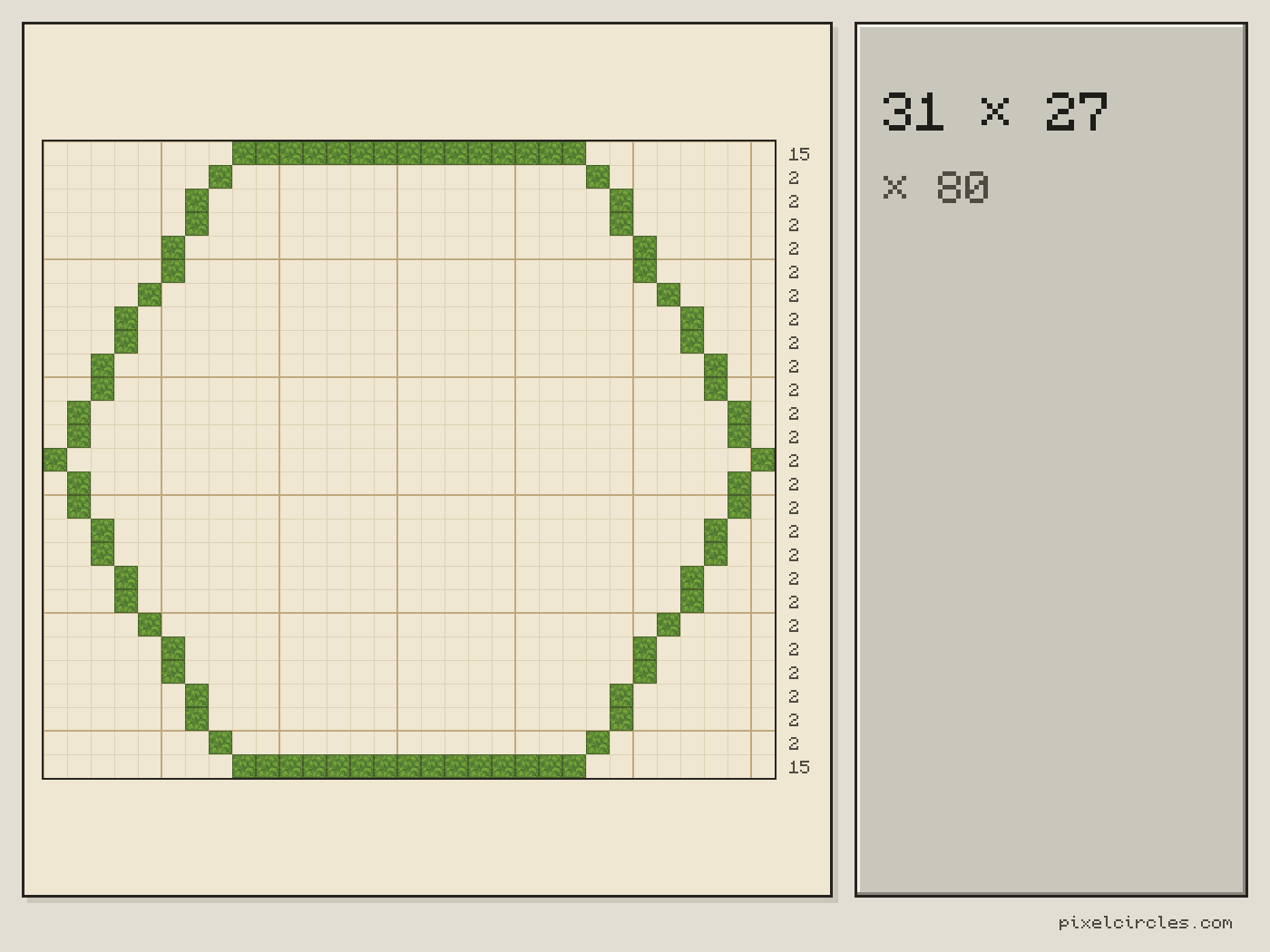
A Minecraft hexagon 31 blocks corner to corner takes 80 blocks as an outline and 625 blocks filled, and it lies 27 blocks from edge to edge. This Minecraft hexagon generator draws regular polygons from 3 to 12 sides: an octagon 20 blocks across its corners (an 18×18 footprint) needs 52 blocks, and a triangle 15 blocks across its corners (a 13×11 footprint) needs 31. Works for Java and Bedrock. Download a .litematic schematic and import it into Minecraft Java with Litematica — build over the hologram in survival or paste it in creative.
| Material | Blocks |
|---|---|
| Stone | 80 |
- Blocks
- 80
- Stacks of 64
- 1 stack + 16
- Width × length
- 31 × 27
- Corner to corner
- 31 blocks
- Side length
- 15.5 blocks
- Placed
- 0 / 80
Click a block to mark it placed.
Readout coordinates: x points east and z south, counted from the centre block; on an even size, 0, 0 is the block just south-east of the centre.
Keys: ↑↓ size · T style · E tools
For the Litematica mod: put the file in .minecraft/schematics, press M in game, then Load Schematics. The file lays the shape flat on the ground.
Row-by-row block counts
| Row | Blocks | Columns with a block |
|---|---|---|
| 1 | 15 | 9–23 |
| 2 | 2 | 8, 24 |
| 3 | 2 | 7, 25 |
| 4 | 2 | 7, 25 |
| 5 | 2 | 6, 26 |
| 6 | 2 | 6, 26 |
| 7 | 2 | 5, 27 |
| 8 | 2 | 4, 28 |
| 9 | 2 | 4, 28 |
| 10 | 2 | 3, 29 |
| 11 | 2 | 3, 29 |
| 12 | 2 | 2, 30 |
| 13 | 2 | 2, 30 |
| 14 | 2 | 1, 31 |
| 15 | 2 | 2, 30 |
| 16 | 2 | 2, 30 |
| 17 | 2 | 3, 29 |
| 18 | 2 | 3, 29 |
| 19 | 2 | 4, 28 |
| 20 | 2 | 4, 28 |
| 21 | 2 | 5, 27 |
| 22 | 2 | 6, 26 |
| 23 | 2 | 6, 26 |
| 24 | 2 | 7, 25 |
| 25 | 2 | 7, 25 |
| 26 | 2 | 8, 24 |
| 27 | 15 | 9–23 |
How to use
- Set the size and options above the plan.
- Click a block to mark it placed as you build.
- Download the .litematic, or print the plan.
This Minecraft hexagon generator turns a size and a number of sides into a flat block plan. Give the size across the corners or the length of one side, turn the shape, and choose a thin or thick outline or a filled floor.
How to build a hexagon in Minecraft
A hexagon has six equal sides, and on a square block grid only its top and bottom sides run along the grid. The other four sides run at 60 degrees, so they turn into a repeating stair of blocks. Eyeballing that stair is where hexagons go wrong, because one side ends up a block longer than the mirror side. The Minecraft hexagon generator draws the shape exactly: it places a regular polygon inside a circle of the size you give and fills every block whose centre falls inside all its sides. The result is symmetrical, so you can build one half and mirror it.
With rotation at 0 the shape stands on a flat side: a hexagon has a flat top and bottom, a triangle points up and an octagon has flat sides on all four edges. Turn it 30 degrees and the hexagon stands on a corner instead.
Minecraft octagon and triangle generator
The same tool builds a Minecraft octagon generator plan: set the sides to 8. It builds a Minecraft triangle generator plan at 3 sides, a pentagon at 5 and a dodecagon at 12. An octagon with a size of 20 blocks between corners uses 52 blocks as an outline and 284 filled, and it covers an 18×18 footprint, because the width over the flat sides is less than the size measured between corners. A triangle with a size of 15 uses 31 blocks as an outline and 71 filled, and it covers a 13×11 footprint.
Step-by-step Minecraft hexagon generator guide
- Set the sides. Use the Sides slider or a preset: hexagon, octagon, triangle, pentagon or dodecagon.
- Set the size. Corner to corner is the width of the circle around the polygon. Choose Side length instead if you know how long each side should be; the generator converts it to the size and shows both.
- Turn it. Rotation from 0 to 359 degrees. A hexagon repeats every 60 degrees, an octagon every 45.
- Choose hollow or filled. Hollow draws a line you set from 1 to 8 blocks wide; filled gives a solid floor.
- Build row by row. Mark blocks on the plan as you place them, or follow the row counts in the table under the plan.
- Export. Save the plan as a PNG or download a .litematic file that lays the shape flat on the ground.
Block counts for hexagons
A regular hexagon is as wide as the circle around it, and about 87% of that from side to side. The table lists the hexagons builders use most; every count comes from the same generator as the plan above.
| Corner to corner | Height | Outline blocks | Filled blocks | Side length |
|---|---|---|---|---|
| 9 | 7 | 20 | 47 | 4.5 |
| 15 | 13 | 40 | 147 | 7.5 |
| 21 | 19 | 56 | 295 | 10.5 |
| 31 | 27 | 80 | 625 | 15.5 |
| 41 | 35 | 108 | 1,079 | 20.5 |
| 51 | 45 | 136 | 1,707 | 25.5 |
| 64 | 56 | 172 | 2,680 | 32.0 |
| 101 | 87 | 272 | 6,599 | 50.5 |
Other polygons at the same size
This second table keeps the size at 31 blocks and changes the number of sides, so you can see how the block count and the side length change as the shape gets closer to a circle. Past about 12 sides the shape is hard to tell from a circle, and the circle generator is the better tool.
| Sides | Shape | Outline blocks | Filled blocks | Side length |
|---|---|---|---|---|
| 3 | Triangle | 67 | 305 | 26.8 |
| 4 | Square | 80 | 441 | 21.9 |
| 5 | Pentagon | 80 | 570 | 18.2 |
| 6 | Hexagon | 80 | 625 | 15.5 |
| 7 | Heptagon | 82 | 655 | 13.5 |
| 8 | Octagon | 80 | 697 | 11.9 |
| 10 | Decagon | 84 | 699 | 9.6 |
| 12 | Dodecagon | 84 | 705 | 8.0 |
Ideas for hexagons and polygons
- Hex towers and gazebos: a hexagon with a cone roof on top from the cone generator.
- Octagonal keeps and lighthouses: an octagon looks rounder than a square and is far easier to build than a circle.
- Hexagon floors and arenas with a filled floor and a hollow outline in another block.
- Triangles for pyramids, flags, road signs and gable ends.
- Honeycomb builds: repeat one hexagon at the same size and rotation, then trim the shared walls by hand.
Tips for better polygons
The size is measured across the circle around the polygon, so a square of size 20 is only 14 blocks on each side. If you need a specific wall length, switch to Side length. For a thicker wall, raise the line width instead of building a second ring. To fit a polygon in a space, choose the size that matches the shorter of the space's two dimensions, then check the bounding size in the stats, which gives the exact width and height in blocks.
Frequently asked questions
How do I make a hexagon in Minecraft?
Enter the size you want, the width across the corners, in the hexagon generator with 6 sides and copy the plan row by row. The top and bottom sides run straight along the grid, and the four slanted sides are the same stair on each side, so build one half and mirror it.
How many blocks does a Minecraft hexagon need?
With the Minecraft hexagon generator, a hexagon 31 blocks across the corners uses 80 blocks as an outline and 625 filled. One that is 20 blocks across the corners uses 52 as an outline. The Stats panel gives the exact count and the number of stacks of 64 for any size.
How do I make an octagon in Minecraft?
Set the sides to 8. An octagon sized 20 blocks between corners uses 52 blocks as an outline and covers an 18×18 footprint, because its flat sides are closer together than its corners. All eight sides come out the same length, with the same stair on each diagonal side.
How do I make a triangle in Minecraft?
Set the sides to 3. A triangle sized 15 blocks across its corners uses 31 blocks as an outline and 71 filled, and covers a 13×11 footprint (width × rows). It points up at 0 degrees; turn it 180 degrees to point down.
What is the difference between size and side length?
Size is the width of the circle around the polygon, measured across the corners. Side length is the length of one side on paper. For a hexagon the two are linked: the side is half the size, so a hexagon with a size of 20 has sides of 10 blocks. Pick whichever you have measured.
Can I download the hexagon for Litematica?
Yes. Choose a block and press .litematic in the tools. The file lays the polygon flat on the ground, one block thick. Put it in .minecraft/schematics, press M in the game and load it.
Can I import this build straight into Minecraft?
Yes, on Java Edition with the Litematica mod. Install Fabric and MaLiLib, put the .litematic file in .minecraft/schematics, then press M → Load Schematics in Minecraft. In survival, the build appears as a translucent hologram and you place blocks over it; Easy Place can place one block at a time from the projection. In creative, Litematica can paste the whole build into your world; on a server you need administrator (op) permission. Bedrock Edition cannot use .litematic files, so follow the grid and layer plans instead.