 PixelCircles
Minecraft Gradient Generator
A 9-step Minecraft gradient from white concrete to black concrete has Cyan Terracotta in the middle step, and no two neighbouring blocks differ by more than 14.4 ΔE, where black against white is 100. Use this Minecraft gradient generator as a Minecraft gradient maker for blocks: it picks the blocks between the two you choose by CIEDE2000 colour difference, takes each block's colour from the average of its vanilla 1.20.2 texture, and shows a colour bar, the change at each step and a block list you can copy. Download a .litematic schematic and import it into Minecraft Java with Litematica — build over the hologram in survival or paste it in creative.
| Step | Block | Colour | Change (ΔE) | Off ideal (ΔE) |
|---|---|---|---|---|
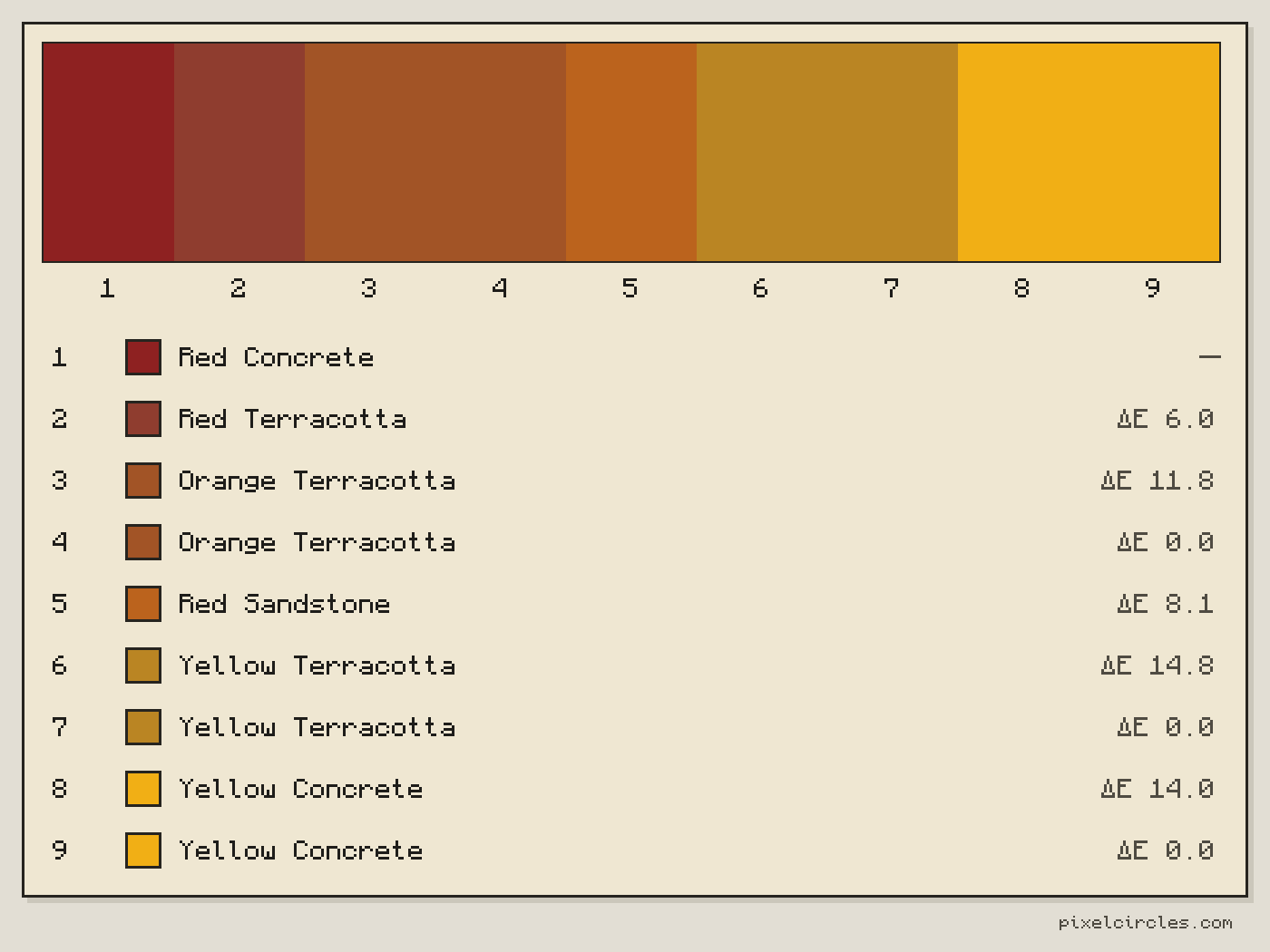
| 1 start | Red Concrete red_concrete | #8e2121 | — | 0.0 |
| 2 | Red Terracotta red_terracotta | #8f3d2f | 6.0 | 3.9 |
| 3 | Orange Terracotta orange_terracotta | #a25426 | 11.8 | 4.8 |
| 4 | Orange Terracotta orange_terracotta | #a25426 | 0.0 | 4.1 |
| 5 | Red Sandstone red_sandstone | #bb631d | 8.1 | 2.4 |
| 6 | Yellow Terracotta yellow_terracotta | #ba8523 | 14.8 | 8.1 |
| 7 | Yellow Terracotta yellow_terracotta | #ba8523 | 0.0 | 6.7 |
| 8 | Yellow Concrete yellow_concrete | #f1af15 | 14.0 | 5.2 |
| 9 end | Yellow Concrete yellow_concrete | #f1af15 | 0.0 | 0.0 |
- Steps
- 9
- Different blocks
- 6
- Largest jump
- 14.8
- Average jump
- 6.8
ΔE is the colour difference between neighbours (CIEDE2000): 1 to 2 is about the least a person can see side by side, 100 is black against white. Lower jumps look smoother.
Keys: ↑↓ steps · E tools
Colours are the average of each block's texture, so they are a close guide: shading and pattern change how a block looks in the world. For the Litematica mod: put the file in .minecraft/schematics, press M in game, then Load Schematics. The file is one row of blocks, one per step.
How to use
- Pick the From and To blocks.
- Set the steps and the blocks in between.
- Download the .litematic, or copy the list.
This Minecraft gradient maker turns two blocks and a number of steps into a row of blocks that fades from one to the other. Add a middle block to bend the fade through a colour, limit it to wool, concrete or terracotta, and copy the list.
How the Minecraft gradient generator picks blocks
A gradient in Minecraft is a run of blocks whose colours change in even steps. Guessing that by eye is hard, because the block that looks halfway between two others is often not the one you expect. The gradient generator does it by numbers. It converts the colour of every block to CIELAB, a colour space where equal distances look like equal differences, and draws a straight line between your two blocks; if you add a middle block the line bends through it. Every step gets the block whose colour is nearest to its point on the line, measured with CIEDE2000, the colour-difference formula of the CIE.
The colours are the average of each block's texture in vanilla Minecraft 1.20.2. They are a close guide and not an exact match: pattern and shading change how a block looks once it is in the world.
How to make a gradient in Minecraft
- Pick the ends. Choose the block to start from and the block to end on. Both are always in the result.
- Choose the steps. From 2 to 32. More steps make a smoother fade but need more different blocks.
- Add a middle block if you want one. The fade passes through it at the middle step, which is how you make a gradient that goes through a colour, such as white through light blue to blue.
- Limit the palette. The blocks in between come from all 65 blocks, or only from the 16 wool, 16 concrete or 17 terracotta blocks, so the build stays in one material.
- Read the numbers. Each step shows the colour change from the block before it, in ΔE. Lower jumps look smoother; 1 to 2 is about the least a person can see side by side.
- Build it. Copy the list, save the picture or download the row as a
.litematicfile.
Repeat blocks or use each block once
Repeat blocks is on by default: each step takes the block whose colour is nearest to its ideal colour, and a block can repeat next to itself. A long gradient then becomes bands of one block, which is how many wall and roof gradients are built anyway. With wool only, 9 steps from white to black uses just 4 of the 16 colours.
Turn Repeat blocks off to use every block once. The generator then only takes blocks within 12 ΔE of the ideal colour of their step, so it never slips in a block of a different colour just to fill a step. When too few blocks fit, it shows fewer steps than you asked for and says so: white to black concrete in 32 steps shows 14 steps, and in wool only 4. Turn Repeat blocks back on to get all 32.
In both modes the fade only ever gets lighter, or only darker, from the first block to the last. A block that is lighter than both ends or darker than both is never used, and the fade never turns back.
Ready Minecraft block gradients
These are 9-step gradients on the full palette with Repeat blocks on, built by the same generator as the tool above. Open one to change the steps, the palette or the middle block.
| Gradient | Blocks in order, 9 steps | Largest jump (ΔE) |
|---|---|---|
| White to black | White Concrete, White Concrete, Smooth Stone, Stone, Cyan Terracotta, Gray Wool, Gray Concrete, Black Wool, Black Concrete | 14.4 |
| Red to yellow | Red Concrete, Red Terracotta, Orange Terracotta, Orange Terracotta, Red Sandstone, Yellow Terracotta, Yellow Terracotta, Yellow Concrete, Yellow Concrete | 14.8 |
| Yellow to green | Yellow Concrete, Yellow Concrete, Yellow Terracotta, Yellow Terracotta, Oak Planks, Lime Terracotta, Lime Terracotta, Green Wool, Green Concrete | 18.0 |
| Green to blue | Lime Concrete, Lime Concrete, Lime Terracotta, Lime Terracotta, Cyan Terracotta, Cyan Terracotta, Blue Terracotta, Blue Concrete, Blue Concrete | 22.3 |
| Orange to brown | Orange Concrete, Orange Concrete, Red Sandstone, Orange Terracotta, Orange Terracotta, Orange Terracotta, Brown Wool, Brown Wool, Brown Concrete | 11.5 |
| Black to red | Black Concrete, Black Terracotta, Nether Bricks, Nether Bricks, Nether Bricks, Red Concrete, Red Concrete, Red Concrete, Red Concrete | 23.4 |
| Blue to white | Blue Concrete, Blue Wool, Blue Wool, Light Blue Terracotta, Light Blue Terracotta, Light Blue Terracotta, Smooth Stone, White Concrete, White Concrete | 22.1 |
| Brown to white | Brown Concrete, Brown Wool, Spruce Planks, Light Gray Terracotta, Light Gray Wool, Smooth Stone, Smooth Stone, White Concrete, White Concrete | 17.5 |
Minecraft gradient generator ideas for builds
- Sunset skies and skyboxes: red to yellow, or orange to brown, with one band of blocks per step.
- Towers and skyscrapers: white to black, or blue to white, with each floor one step lighter.
- Terrain and cliffs: brown to white for a mountain fading into snow, or green to blue for a hill running down into water.
- Pixel art shading: use a gradient as a set of tones for a ball, a sphere or a shadow.
- Floors and paths that fade from one material to another over 8 to 16 blocks.
Tips for a smoother gradient
Concrete is the most saturated of the colour blocks, wool is slightly softer and terracotta is muted and earthy, so a gradient that mixes them can look patchy. If you want a clean fade, stay in one palette. If you want a natural, weathered look, choose the full palette and let stone, planks and terracotta join in. Check the Largest jump number: when one step is far larger than the rest, add a middle block near that colour or raise the number of steps.
The Litematica file is one row of blocks with one block per step. Put it in .minecraft/schematics, press M in the game and load it, then stack or copy the row for wider bands.
Frequently asked questions
How do I make a gradient in Minecraft?
Use the Minecraft gradient generator: pick a start block and an end block, choose how many steps you want and read off the blocks in between. A gradient is the run of blocks whose colours change in even steps from one end to the other; the generator picks them by colour, so you do not have to compare blocks by eye. It works as a gradient maker Minecraft players can use for any palette, with nothing to install.
What blocks are best for a Minecraft gradient?
Wool, concrete and terracotta come in 16 colours each, so they give the cleanest fades: concrete is bright, wool is softer, terracotta is muted. The full palette adds planks, stone, sandstone, bricks and more, which helps for earthy or grey gradients.
How many steps should a gradient have?
Between 5 and 12 for most builds. With the full palette of 65 blocks you can go up to 32 steps. Repeat blocks is on by default, so every step count works. With it off you get one block per step and only as many steps as there are blocks close enough in colour: white to black concrete in 32 steps shows 14.
What does ΔE mean?
ΔE is the colour difference between two blocks, measured with CIEDE2000. Zero is the same colour, 1 to 2 is about the smallest difference a person can notice side by side, and black against white is 100. The lower the jumps between neighbouring steps, the smoother the gradient.
Can the gradient go through a middle colour?
Yes. In the Minecraft gradient generator, choose a Through block and the fade bends through it at the middle step, so you can go from white through light blue to blue. With only 2 steps there is no room for a middle block.
How accurate are the colours?
They are the average colour of each block's texture in vanilla Minecraft 1.20.2, so they are close but not exact. Texture patterns, shading and light in the world change how a block looks, so check a small sample in your world before you build the whole gradient.
Can I copy the block list?
Yes. Copy list in the Tools panel, and Copy in the title block, put the blocks on your clipboard in order, one per line with its step number, followed by the largest jump between neighbours in ΔE and a link to the same gradient. Paste it into a chat, a build note or a shopping list.
Can I import this build straight into Minecraft?
Yes, on Java Edition with the Litematica mod. Install Fabric and MaLiLib, put the .litematic file in .minecraft/schematics, then press M → Load Schematics in Minecraft. In survival, the build appears as a translucent hologram and you place blocks over it; Easy Place can place one block at a time from the projection. In creative, Litematica can paste the whole build into your world; on a server you need administrator (op) permission. Bedrock Edition cannot use .litematic files, so follow the grid and layer plans instead.